If you somehow stumbled across this article while looking for the best gaming mouse for Apex Legends, then welcome. Based on that, I’m going to assume you’re a mouse and keyboard (MnK) player, and you have my respect because it takes time, effort, dedication, and countless hours of trial and error to actually become good at Apex Legends using MnK.
Since Apex Legends is a movement-based shooter, you probably already know how easy it is to one-clip a brick wall instead of an actual player once they start moving. In Apex, having a better gaming mouse can be the difference between standing still while shooting and tap-strafing all over the place before hitting a Peacekeeper shot on a roller player who’s relying on aim assist to track you.
Think of it this way. When you have the best football boots and a quality football (it’s football, not soccer—Zlatan Ibrahimović would agree), you naturally give yourself a better opportunity to improve faster than someone who doesn’t even have a ball or proper boots. The same principle applies to gaming mice. A good gaming mouse won’t magically make you an Apex Predator overnight, but it gives you the tools to practice more effectively. A lightweight mouse makes flicking, tracking, and even looting death boxes feel much easier, allowing you to focus on improving your mechanics instead of fighting your hardware.
One thing that truly separates many controller players from MnK players is movement. With a lightweight mouse, a reliable sensor, and a good scroll wheel, movement techniques become much easier to perform consistently. Tap strafing, mantle jumping, super jumping, Ras strafing, and Neo strafing all become more natural once your mouse responds exactly the way you expect it to. Simply binding your scroll wheel forward to “Move Forward” and scroll wheel down to “Jump” opens the door to many of Apex’s advanced movement mechanics.
At the end of the day, you don’t need a ridiculously expensive gaming mouse to improve. What you really need is a reliable sensor, a comfortable shape, responsive switches, a solid scroll wheel, and a lightweight design that lets you move effortlessly around your mousepad.
Affiliate Disclosure
Some of the links in this article are affiliate links, which means I may earn a small commission if you purchase a product through one of these links, at no additional cost to you. This helps support me and allows me to continue creating gaming guides and hardware recommendations.
That said, what should you expect when buying a gaming mouse for Apex Legends?
What to Expect When Buying a Gaming Mouse for Apex Legends
Weight
Since we know Apex Legends is a fast-paced movement shooter, heavy mice simply won’t cut it. Not only do they feel slower, but your arm will also get tired much faster during long gaming sessions. For Apex Legends, I recommend a mouse weighing between 50–70g. Lightweight mice are easier to flick, track enemies, and make quick adjustments during intense fights, especially when players are tap-strafing or wall bouncing around you.
Sensor
One of the most important parts of any gaming mouse is the sensor. Fortunately, modern gaming mice are equipped with incredibly accurate sensors, so you don’t have to worry about tracking issues if you buy from a reputable brand.
Some of the best sensors you’ll come across include the PixArt PAW3395, Razer Focus Pro, and Logitech HERO 2. These sensors offer exceptional tracking accuracy, low latency, and virtually no spin-outs, making them perfect for competitive games like Apex Legends where every movement counts.
Polling Rate
The polling rate refers to how many times per second your mouse reports its position to your computer.
You’ll typically find three options:
- 1000Hz – Standard on most gaming mice and more than enough for the vast majority of players.
- 4000Hz – Found on many premium wireless gaming mice and offers slightly lower input latency.
- 8000Hz – Available on flagship gaming mice.
The funny thing is that while 8000Hz sounds impressive on paper, the difference between 4000Hz and 8000Hz is almost impossible for humans to notice in actual gameplay. Even many professional players still use 1000Hz, so don’t feel pressured to spend extra money just because a mouse advertises a higher polling rate.
Shape
Mouse shape is just as important as the sensor. Your hand size and grip style will determine which mouse feels the most comfortable.
Before buying a gaming mouse, measure your hand using a ruler or measuring tape. This makes it much easier to determine whether a mouse is better suited for a palm grip, claw grip, or fingertip grip. A comfortable shape will improve consistency far more than chasing the latest specifications.
Wired or Wireless
If you’re shopping on a tight budget, a wired gaming mouse usually offers the best value. You don’t have to worry about charging it, and you’ll often get better hardware than a similarly priced wireless model.
However, once your budget reaches around $80 or more, modern wireless gaming mice become an excellent choice. Thanks to advances in wireless technology, many now offer latency that’s virtually indistinguishable from wired mice while giving you complete freedom of movement.
DPI
DPI (Dots Per Inch) determines how sensitive your mouse is. Most gaming mice allow you to change your DPI using the manufacturer’s software.
The best DPI is ultimately personal preference, but many Apex Legends players use settings such as:
- 400–800 DPI for lower sensitivity.
- 1600 DPI with a lower in-game sensitivity for smoother tracking.
One thing many gamers don’t talk about is eDPI (Effective DPI). Your eDPI combines your mouse DPI with your in-game sensitivity and represents your true sensitivity.
Formula:
DPI × In-Game Sensitivity = eDPI
Comparing eDPI is often much more useful than comparing DPI alone because two players using different DPI values can end up with exactly the same overall sensitivity.
Mouse Feet
Look for mice with 100% Virgin Grade PTFE mouse feet. PTFE skates glide smoothly across almost every mousepad, making fast flicks, tracking, and micro-adjustments feel effortless during intense Apex fights.
Build Quality
Build quality matters more than many people realize. A gaming mouse made from cheap plastic may develop wobbling buttons, poor scroll wheels, or inconsistent clicks over time.
Before buying, always read reviews from people who have used the mouse for several months. I also recommend choosing a mouse with responsive side buttons, as they can be useful for binding push-to-talk, healing, or other in-game actions depending on your playstyle.
Best Overall Gaming Mouse for Apex Legends
Logitech G Pro X Superlight 2
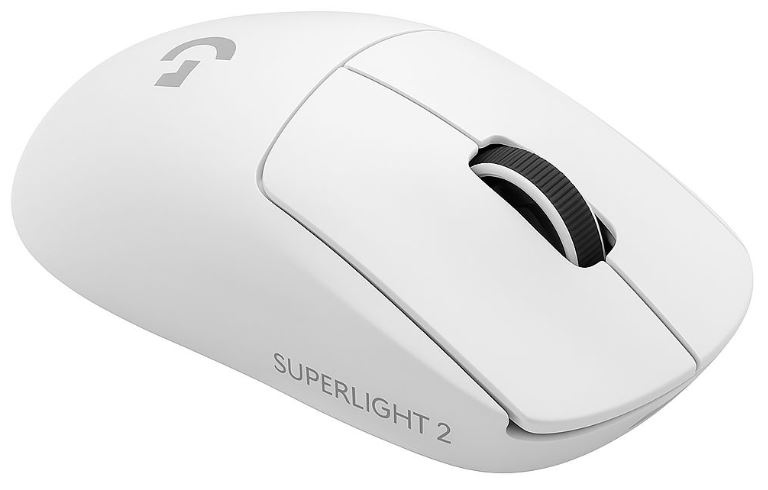
Approx. Price: $130–160
Pros
- Ultra-lightweight (around 60g)
- HERO 2 sensor with exceptional tracking
- Excellent battery life
- Reliable wireless performance
- Comfortable shape for most grip styles
- Premium build quality
Cons
- No RGB lighting
- Expensive
- No left-handed version
Why It’s Great for Apex Legends
The Logitech G Pro X Superlight 2 has earned its reputation as one of the best gaming mice for competitive FPS games. Its lightweight design, incredible sensor accuracy, and dependable wireless performance make flick shots, recoil control, and long-range tracking feel effortless. Whether you’re one-clipping an Octane or chasing a Horizon through the air, this mouse consistently delivers the precision Apex Legends demands.
Best Value Gaming Mouse
VXE R1 Pro / Attack Shark X3
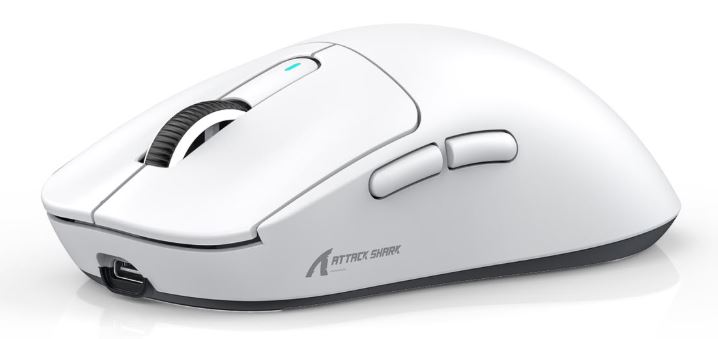
Approx. Price: $30–40
Pros
- Excellent sensors for the price
- Lightweight designs
- Low wireless latency
- Long battery life
- Great software customization
Cons
- Build quality isn’t quite as refined as Logitech or Razer
- Software can occasionally be inconsistent
Why They’re Great for Apex Legends
These two mice prove that you don’t have to spend over $100 to get competitive performance. They offer smooth tracking, low latency, and lightweight designs that rival much more expensive mice, making them some of the best value choices for ranked Apex players.
Best Competitive Gaming Mouse
Razer Viper V3 Pro
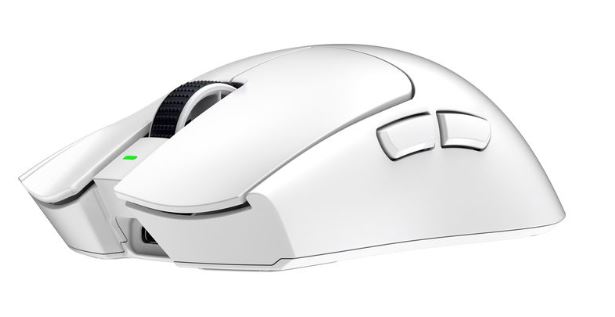
Approx. Price: $140–160
Pros
- Extremely lightweight
- Razer Focus Pro optical sensor
- Outstanding wireless performance
- Responsive optical switches
- Excellent for claw and fingertip grip
Cons
- Premium price
- Battery life isn’t quite as long as Logitech’s
Why It’s Great for Apex Legends
Built with esports in mind, the Razer Viper V3 Pro is one of the fastest and most responsive gaming mice available today. Its lightweight shell and exceptional sensor make fast flicks, recoil control, and advanced movement techniques feel incredibly natural. It’s no surprise that many professional FPS players trust it in competition.
Best Palm Grip Gaming Mouse
Pulsar X3 / Lamzu Thorn
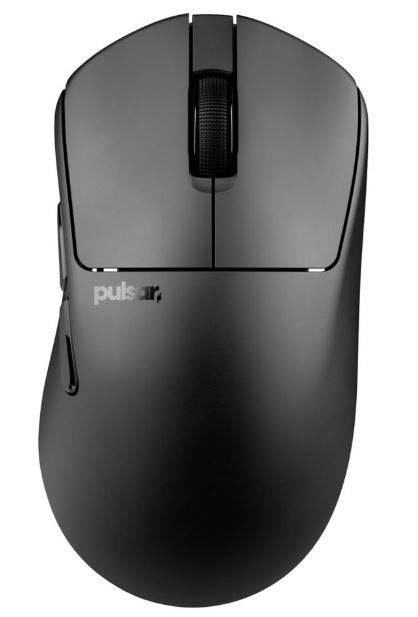
Approx. Price: $80–130
Pros
- Comfortable ergonomic design
- Excellent sensors
- Lightweight construction
- Long battery life
- Great support for larger hands
Cons
- May feel too large for smaller hands
- Less suited for aggressive claw grip users
Why They’re Great for Apex Legends
If you’re a palm grip player, comfort becomes increasingly important during long ranked sessions. These mice provide excellent hand support while still being lightweight enough for smooth tracking, quick flicks, and consistent control throughout extended gaming sessions.
Best Claw Grip Gaming Mouse
Endgame Gear OP1 / Lamzu Atlantis
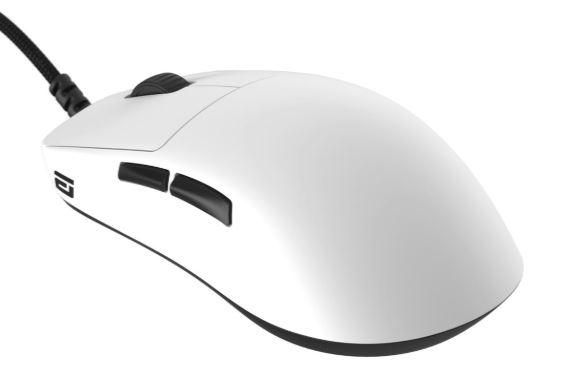
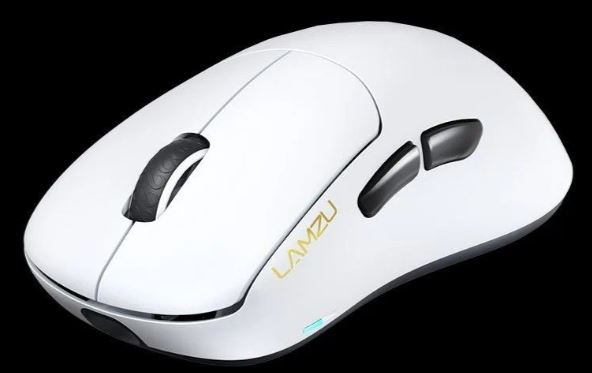
Approx. Price: $80–110
Pros
- Lightweight designs
- Crisp, responsive clicks
- Excellent tracking
- Shapes designed specifically for claw grip
Cons
- Battery life varies depending on the model
- Some users may prefer a more premium shell finish
Why They’re Great for Apex Legends
Claw grip players rely on quick, explosive movements and precise control. These mice complement that playstyle perfectly, making rapid flicks, tracking, and advanced movement techniques like tap strafing and super jumping feel more controlled and consistent.
Best Fingertip Grip Gaming Mouse
WLMouse Beast X / Finalmouse ULX
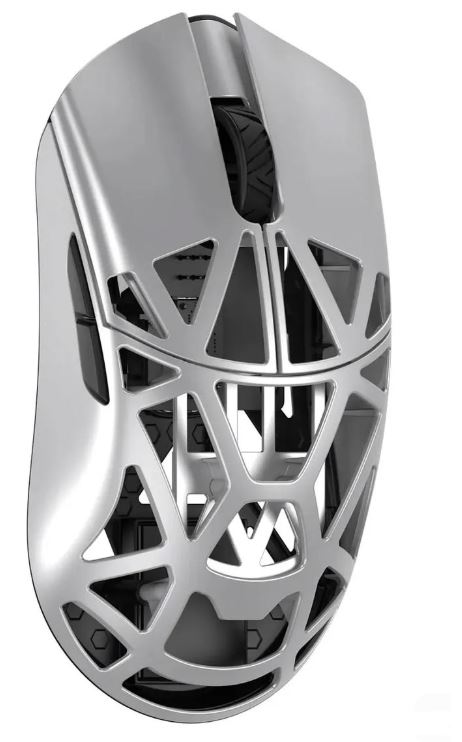
Approx. Price: $90–180
Pros
- Extremely lightweight
- Outstanding sensors
- Minimal drag
- Excellent for micro-adjustments
Cons
- Less comfortable for palm grip users
- Finalmouse models can be expensive and difficult to find
Why They’re Great for Apex Legends
Fingertip grip players benefit from the lightest mice possible. These models allow incredibly fast micro-adjustments and effortless tracking, making them excellent choices for players who rely on speed, precision, and constant mouse movement during fights.
Best Budget Gaming Mouse
Razer Cobra / MCHOSE G3 Pro / HyperX Pulsefire Haste 2
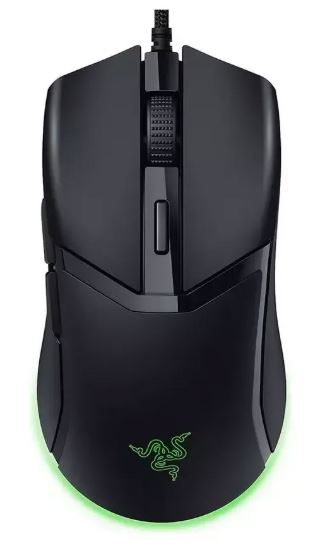
Approx. Price: $20–70
Pros
- Lightweight
- Reliable sensors
- Responsive switches
- Excellent value for money
Cons
- Fewer premium features
- Battery life varies on wireless versions
- Build quality isn’t as refined as flagship models
Why They’re Great for Apex Legends
If you’re just getting into Apex Legends or upgrading from a basic office mouse, these are fantastic places to start. They provide accurate tracking, low latency, and lightweight designs that make aiming and movement significantly easier without emptying your wallet. For most players, they’ll deliver everything needed to compete comfortably in ranked.
Common Mistakes When Buying a Gaming Mouse (and How to Avoid Them)
1. Buying the Lightest Mouse Because a Pro Uses It
Chasing ultra-light gaming mice (sub-50g) just because your favorite professional player uses one.
Why it’s a mistake: Professional players have different hand sizes, grip styles, years of experience, and thousands of hours of practice. A super-light mouse may actually feel too sensitive or unstable for the average player, leading to inconsistent tracking and worse aim.
Better approach: Prioritize comfort and control over weight alone. For most Apex Legends players, a mouse weighing between 55–75g offers an excellent balance between speed, stability, and precision.
2. Copying ALGS Pro Sensitivity
Using the exact sensitivity settings from your favorite ALGS (Apex Legends Global Series) player.
Why it’s a mistake: Professional players have spent years developing muscle memory on their own settings. Blindly copying their sensitivity often makes your aim feel uncomfortable and inconsistent because your mouse, mousepad, grip, and playstyle are completely different.
Better approach: Find a sensitivity that feels natural to you. A good starting point is 800 or 1600 DPI with an in-game sensitivity that gives you comfortable tracking and flicks. From there, use aim trainers like KovaaK’s or simply practice consistently in the Firing Range to fine-tune your settings.
3. Ignoring Mouse Shape
Focusing only on specifications like DPI, weight, polling rate, or buttons while completely overlooking the mouse shape.
Why it’s a mistake: Even the best gaming mouse will feel terrible if it doesn’t suit your hand size or grip style. The wrong shape can lead to hand fatigue, poor control, and inconsistent aim during long ranked sessions.
Better approach: Choose a mouse that matches your palm grip, claw grip, or fingertip grip. Read reviews from people with similar hand sizes and don’t be afraid to prioritize comfort over flashy specifications.
4. Buying an Expensive Mouse Before a Good Mousepad
Spending over $100 on a premium gaming mouse while using an old, worn-out, or low-quality mousepad.
Why it’s a mistake: A gaming mouse is only as good as the surface it’s tracking on. Poor mousepads reduce glide consistency and tracking accuracy, making even flagship gaming mice feel disappointing.
Better approach: Invest in a quality cloth or hybrid gaming mousepad first. A good mousepad paired with a solid mid-range mouse will almost always outperform a flagship mouse sitting on a poor surface.
5. Focusing Only on DPI Instead of eDPI
Many gamers assume that using an extremely high or extremely low DPI automatically makes them better.
Why it’s a mistake: DPI alone doesn’t determine your actual sensitivity. Your effective DPI (eDPI) is what really matters because it combines both your mouse DPI and your in-game sensitivity. Two players can use completely different DPI values but end up with exactly the same overall sensitivity.
Better approach: Instead of copying someone else’s DPI, focus on finding an eDPI that feels comfortable for your playstyle. Whether you use 800 DPI, 1600 DPI, or another value, consistency and muscle memory will improve your aim far more than chasing numbers.
Conclusion
At the end of the day, the best gaming mouse for Apex Legends isn’t necessarily the most expensive one—it’s the one that fits your hand size, grip style, and playstyle. A comfortable mouse with a reliable sensor, lightweight design, and responsive clicks will always help you perform more consistently than chasing flashy specifications or copying what your favorite ALGS pro uses.
Remember, a gaming mouse won’t magically make you an Apex Predator overnight. Good aim, movement, positioning, and game sense still win matches. However, the right mouse removes one more obstacle between you and your true potential. Whether you’re learning how to tap strafe, mastering super jumps, or trying to one-clip an enemy before they disappear behind cover, having a mouse you can trust makes practicing those mechanics far more enjoyable.
If you’re new to Apex Legends, don’t feel pressured to spend over $150 on a flagship mouse. There are plenty of excellent budget and mid-range options that deliver fantastic performance. As your skills improve, you can always upgrade later if you feel the need.
To complete your Apex Legends setup, I also recommend checking out my Best Gaming Monitor for Apex Legends, Best Gaming Keyboard for Apex Legends, Best Gaming Headset for Apex Legends, Best Gaming Mousepad for Apex Legends, Best GPU for Apex Legends, Best CPU for Apex Legends, and Best Gaming Laptop for Apex Legends guides. Together, they’ll help you build a setup that’s optimized for smoother gameplay, higher FPS, and a more competitive Apex Legends experience.
Now get out there, warm up in the Firing Range, stop blaming your teammates for every loss (we’ve all done it), and hopefully your next game ends with a Champion screen and a fresh 20-bomb badge.
Thank you for your time spent on my article. Hope you found what you were looking for.