Apex Legends is a movement-based shooter, and one of the reasons the time-to-kill feels longer than in many other FPS games is because of just how much movement influences every fight. Whether we like it or not, controller players currently dominate much of the player base, even if PlayApex doesn’t exactly like admitting it. For mouse and keyboard (MnK) players to gain an advantage, they have to lean into what makes MnK special—movement.
That’s where a good gaming keyboard comes in. A proper gaming keyboard makes advanced movement mechanics much easier and more consistent to perform. If you’re new to Apex Legends, some movement techniques worth checking out on YouTube include tap strafing, wall bouncing, bunny hopping, mantle jumping, Neo strafing, Pito strafing, super jumping, fatigue wall bouncing, and many more. Mastering these mechanics can make you significantly harder to hit and completely change the way you approach fights.
Knowing how to perform these movement techniques is incredibly important for MnK players because, let’s be honest, there’s nothing more demoralizing than getting knocked by a controller player who barely moved while aim assist did most of the tracking (I think you can feel the pain I’m feeling… right? XD).
Some movement techniques, especially super gliding, require extremely precise timing. Pulling them off consistently is much easier with a quality mechanical keyboard than with a generic membrane keyboard. That’s why you’ll notice almost all of my recommendations in this guide are mechanical keyboards. Unlike membrane keyboards, every keypress is registered individually with greater consistency and responsiveness. Let’s be honest—you’re probably not hitting consistent Neo strafes on a mushy office keyboard anyway.
Affiliate Disclosure
Some of the links in this article are affiliate links, which means I may earn a small commission if you purchase a product through one of these links, at no additional cost to you. This helps support me and allows me to continue creating gaming guides and hardware recommendations.
That said, what should you expect when buying a gaming keyboard for Apex Legends?
What to Expect When Buying a Gaming Keyboard for Apex Legends
Switches
Mechanical keyboards use switches, which are the mechanisms underneath each keycap. The three main types are Linear, Tactile, and Clicky switches.
Here’s a quick explanation:
- Linear switches have a smooth keystroke with no tactile bump, making them the fastest and easiest to spam repeatedly.
- Tactile switches have a noticeable bump during each keypress but don’t produce the loud click associated with clicky switches.
- Clicky switches have both a tactile bump and a loud click every time you press a key.
For Apex Legends, I highly recommend Linear switches. They’re smoother, require less effort to press repeatedly, and are ideal for constant movement inputs like tap strafing, bunny hopping, and wall bouncing. I’d personally avoid Blue (Clicky) switches because Apex requires constant key presses, and listening to loud clicks every few seconds quickly becomes annoying—not just for you, but probably everyone else in the room too.
Hall Effect Switches
Modern gaming keyboards now include advanced features such as Rapid Trigger, Adjustable Actuation, Dynamic Keystrokes, and Snap Tap (SOCD) support.
These features can provide a real advantage in movement-heavy games like Apex Legends. Rapid Trigger, for example, allows keys to reset almost instantly when released, making movement techniques feel much more responsive. Adjustable Actuation lets you choose exactly how far a key needs to be pressed before it activates, while Dynamic Keystrokes allow multiple actions from a single key depending on how deeply it’s pressed.
Some competitive tournaments restrict certain features, so always check the event rules before competing. But if you’re just grinding Ranked at home… well, use every legal advantage you can get. Anything that helps you outplay those roller players.
Keyboard Size
Believe it or not, keyboard size matters in Apex Legends.
Since you’ll constantly be flicking your mouse around the desk, buying a full-size keyboard usually isn’t the best idea. Most gamers rarely use the number pad while playing, so it simply takes up valuable mouse space.
If you still want your Function keys and arrow keys, a TKL (Tenkeyless) keyboard is an excellent choice (it’s what I personally use). If maximizing mouse space is your priority, 60%, 65%, and 75% keyboards are all fantastic options.
Build Quality
A quality keyboard should feel solid with minimal flex, stable switches, and no rattling keys.
Look for keyboards with an aluminum frame or a sturdy plastic chassis paired with PBT keycaps. PBT keycaps are more durable, resist shine better over time, and generally provide a much nicer typing and gaming experience than cheaper ABS keycaps.
Wired or Wireless
Unlike gaming mice, where going wireless noticeably improves freedom of movement, choosing a wireless keyboard is often more about convenience and aesthetics than performance.
If you’re on a budget, a wired gaming keyboard is usually the better value because you never have to worry about charging it. Just imagine your keyboard battery dying during the final ring while you’re standing still waiting to get Krabered… not exactly the way anyone wants to lose RP.
That said, modern premium wireless keyboards now offer latency that’s virtually indistinguishable from wired models, along with impressive battery life. If your budget allows it, both wired and wireless keyboards are excellent choices today.
Best Overall Gaming Keyboard for Apex Legends
Wooting 80HE (or Wooting 60HE+ if you prefer a compact layout)
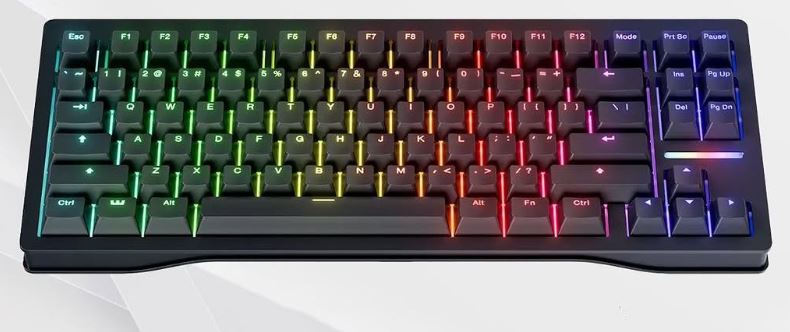
Approx. Price: $180–220 (80HE) / $150–190 (60HE+)
Pros
- Industry-leading Hall Effect switches
- Rapid Trigger and adjustable actuation
- Outstanding software (Wootility)
- Excellent build quality
- Smooth RGB lighting
- Highly customizable
Cons
- Expensive
- Takes time to fully learn all the customization options
- Wired only
Why It’s Great for Apex Legends
If movement is your biggest weapon in Apex Legends, it’s hard to beat the Wooting 80HE. Features like Rapid Trigger and adjustable actuation make movement techniques such as tap strafing, bunny hopping, wall bouncing, and super gliding feel noticeably more responsive. It’s one of the few keyboards that genuinely changes how movement feels once you get used to it.
Best Value Gaming Keyboard
DrunkDeer G65
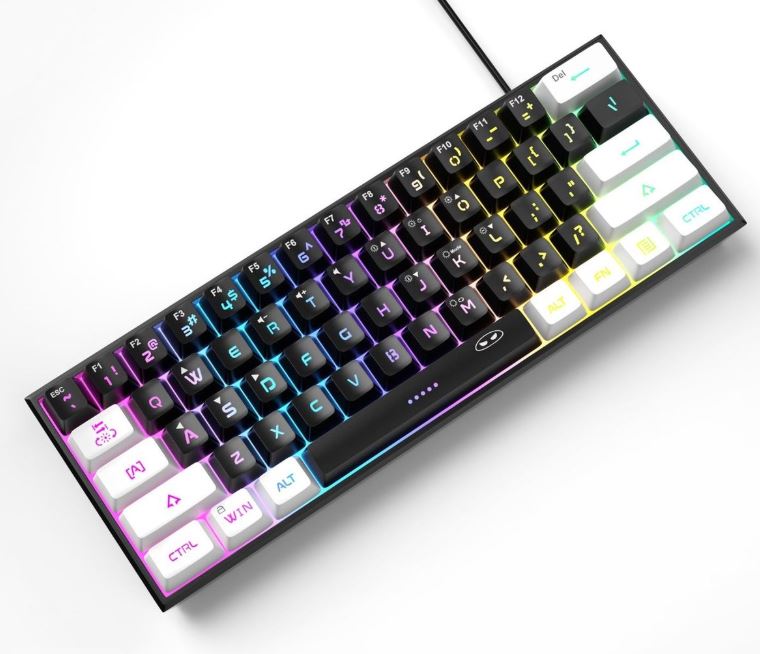
Approx. Price: $80–110
Pros
- Affordable Hall Effect switches
- Adjustable actuation
- Responsive performance
- Good RGB lighting
- Excellent value
Cons
- Software isn’t as polished as Wooting’s
- Build quality isn’t quite flagship level
Why It’s Great for Apex Legends
The DrunkDeer G65 delivers many of the advantages of Hall Effect technology without the premium price tag. You still get incredibly responsive switches and customizable actuation, making advanced movement mechanics much easier while saving a significant amount of money.
Best Competitive Gaming Keyboard
SteelSeries Apex Pro TKL Gen 3
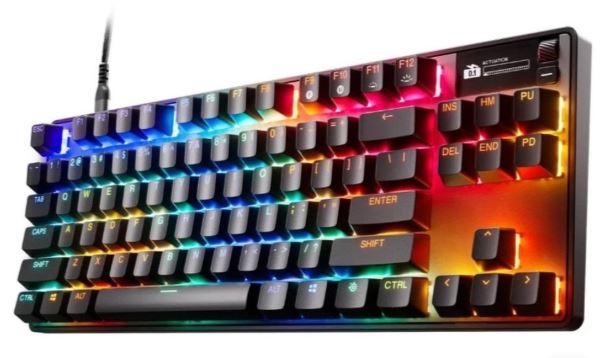
Approx. Price: $150–200
Pros
- OmniPoint Hall Effect switches
- Rapid Trigger support
- Adjustable actuation
- Premium build quality
- Excellent SteelSeries GG software
Cons
- Expensive for a TKL keyboard
- Slightly heavier than some competitors
Why It’s Great for Apex Legends
The SteelSeries Apex Pro TKL Gen 3 has become one of the most popular esports keyboards for a reason. Its incredibly responsive Hall Effect switches make every movement input feel instant, giving competitive Apex players outstanding control during hectic fights and advanced movement sequences.
Best Hall Effect Gaming Keyboard
Keychron Q1 HE
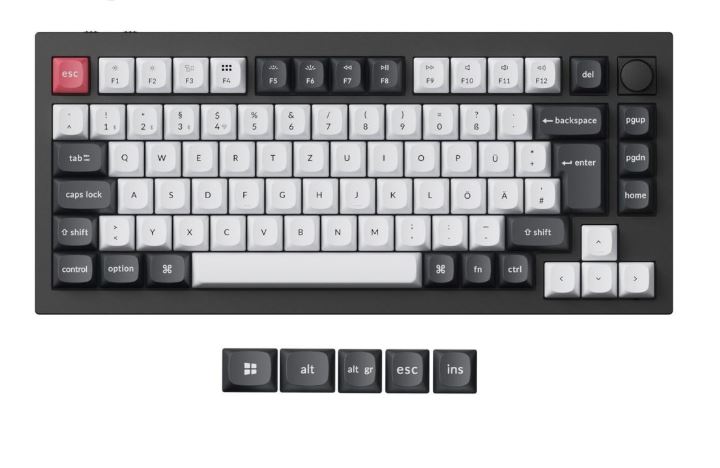
Approx. Price: $120–160
Pros
- Premium aluminum construction
- Hall Effect switches
- Adjustable actuation
- Hot-swappable switches
- Comfortable gasket-mounted design
Cons
- Software still improving
- Heavier than most gaming keyboards
Why It’s Great for Apex Legends
The Keychron Q1 HE combines enthusiast-level build quality with modern Hall Effect technology. It offers excellent responsiveness for movement mechanics while also being one of the nicest keyboards to type on if you use your PC for work or school.
Best Budget Gaming Keyboard
Epomaker HE68 Lite / MonsGeek FUN60 Pro
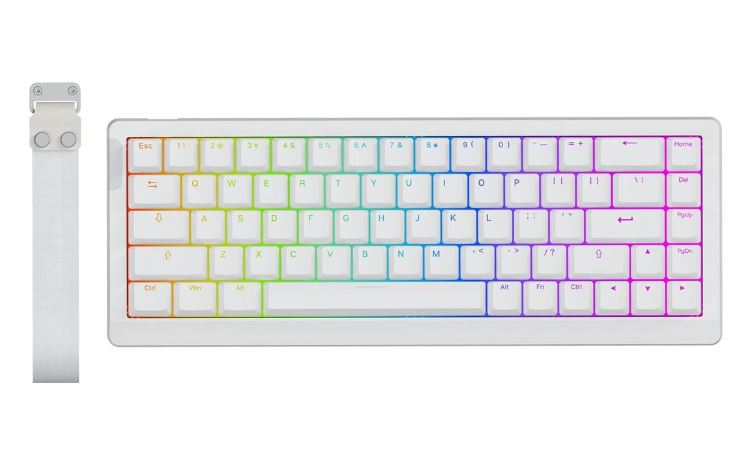
Approx. Price: $50–90
Pros
- Affordable Hall Effect switches
- Compact layouts
- Adjustable actuation
- Good RGB lighting
- Excellent value
Cons
- Simpler software
- Less premium construction
- Wireless versions generally have shorter battery life
Why They’re Great for Apex Legends
If you’re upgrading from a basic membrane keyboard, these are fantastic entry points into Hall Effect technology. They offer smooth switches, quick response times, and customizable actuation without forcing you to spend hundreds of dollars.
Best Wireless Gaming Keyboard
Logitech G Pro X TKL Lightspeed / ASUS ROG Azoth
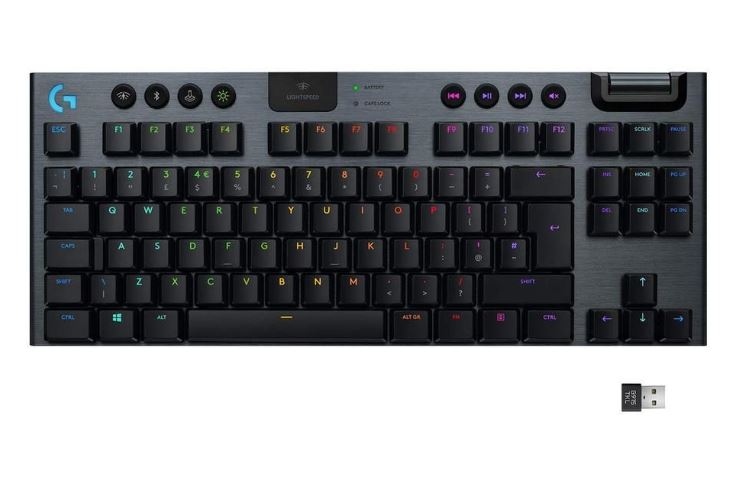
Approx. Price: $170–250
Pros
- Excellent wireless performance
- Long battery life
- Premium build quality
- Reliable low-latency connection
- Compact layouts ideal for FPS gaming
Cons
- More expensive than wired alternatives
- Most wireless options still don’t offer the same Hall Effect features as keyboards like the Wooting
Why They’re Great for Apex Legends
If you prefer a clean, cable-free setup, these wireless keyboards offer exceptional gaming performance with latency that’s virtually indistinguishable from wired models. While they may not include every Hall Effect feature, they’re still outstanding choices for competitive Apex Legends players who value both performance and desk aesthetics.
Which Gaming Keyboard Is Right for You?
Casual Gamer
Recommended: Budget Mechanical Keyboard
Best Pick: Epomaker HE68 Lite or MonsGeek FUN60 Pro (Approx. $50–90)
If you mainly play Apex Legends in your free time and occasionally jump into other games, there’s no need to spend hundreds of dollars on a premium keyboard. These Hall Effect keyboards offer responsive switches, customizable actuation, and smooth gameplay at an affordable price, making them excellent first upgrades from a standard membrane keyboard.
Ranked Grinder
Recommended: Hall Effect Gaming Keyboard
Best Pick: DrunkDeer G65 (Approx. $80–110) or Keychron Q1 HE (Approx. $120–160)
If you’re constantly grinding Ranked and trying to improve every season, a Hall Effect keyboard is well worth considering. Features like Rapid Trigger and adjustable actuation make movement techniques feel smoother and more consistent, helping with tap strafing, bunny hopping, and other advanced mechanics during long gaming sessions.
Competitive Player
Recommended: Rapid Trigger Keyboard
Best Pick: Wooting 80HE (or Wooting 60HE+) (Approx. $150–220)
If you compete in scrims, tournaments, or simply want the absolute best movement experience Apex Legends has to offer, the Wooting is hard to beat. Its incredibly responsive Hall Effect switches, Rapid Trigger technology, and adjustable actuation provide one of the best keyboard experiences available for competitive FPS gaming.
Streamer / Multi-Purpose User
Recommended: 75% or TKL Keyboard
Best Pick: SteelSeries Apex Pro TKL Gen 3 (Approx. $150–200) or Keychron Q1 HE
If you stream, create content, or use your PC for work and gaming, a 75% or TKL keyboard gives you extra function keys and navigation controls without taking up as much desk space as a full-size keyboard. They’re excellent choices for gamers who want competitive performance while still having a practical keyboard for everyday use.
Common Mistakes When Buying a Gaming Keyboard (and How to Avoid Them)
1. Buying Blue Switches (or Other Loud Clicky Switches)
Blue switches (Cherry MX Blue or similar) provide both tactile feedback and a loud click every time you press a key.
Why it’s a mistake for Apex Legends:
The constant clicking quickly becomes distracting during intense fights and can be annoying if you stream, play with teammates, or simply game without headphones. They also generally require a little more force and travel distance than linear switches, making repeated inputs like jumping, crouching, strafing, and weapon swapping feel slower.
In Apex Legends, where movement is everything, you want switches that feel fast, smooth, and fatigue-free.
Better approach: Choose Linear (Red) switches or Hall Effect switches if your budget allows. They provide faster, smoother key presses and are preferred by many competitive FPS players.
2. Buying a Full-Size Keyboard
A full-size (100%) keyboard includes a number pad, making it much wider than necessary for gaming.
Why it’s a mistake for Apex Legends:
A wider keyboard leaves less room for your mouse, forcing awkward arm positioning and limiting large mouse movements. Since Apex Legends relies heavily on tracking and fast flicks, you want as much mouse space as possible.
Many competitive players choose TKL, 75%, 65%, or 60% layouts because they keep the keyboard compact while giving your mouse arm plenty of room to move freely.
Better approach: Buy a TKL or smaller keyboard unless you genuinely need the number pad for work or school.
3. Ignoring Hall Effect (Magnetic) Switches
Hall Effect keyboards use magnetic switches that allow features such as Rapid Trigger and adjustable actuation.
Why it’s a mistake in 2026 for Apex Legends:
These features make movement mechanics feel much more responsive. You can reduce the actuation distance to register inputs almost instantly, making techniques like tap strafing, wall bouncing, bunny hopping, and super gliding easier to perform consistently.
Traditional mechanical switches still work perfectly well, but Hall Effect keyboards provide extra customization and responsiveness that many competitive players appreciate.
Better approach: If your budget allows, choose a Hall Effect keyboard with Rapid Trigger and adjustable actuation. They’re some of the biggest innovations in gaming keyboards over the last few years.
4. Buying a Keyboard Just for RGB
RGB lighting looks great, but some budget “gaming” keyboards spend more money on flashy lighting than on the parts that actually matter.
Why it’s a mistake:
You often end up with cheap stabilizers, low-quality keycaps, inconsistent switches, and poor build quality. None of those things will help you survive a fight in Apex Legends.
Better approach: Prioritize switch quality, build quality, responsiveness, and features first. RGB should always be a bonus—not the reason you buy a keyboard.
5. Using Macros That Violate Game Rules
Some gaming software allows you to create macros that automate multiple actions with a single key press.
Why it’s a mistake:
Using macros for actions such as rapid fire, movement scripts, or super glide automation can violate Apex Legends’ rules and may result in penalties if detected. Besides the risk to your account, it also removes the satisfaction of mastering Apex’s movement mechanics yourself.
Better approach: Stick to normal in-game keybinds and use your keyboard’s advanced features, such as Rapid Trigger and adjustable actuation, as intended. Spend your time improving your movement and muscle memory rather than relying on automation.
Conclusion
At the end of the day, the best gaming keyboard for Apex Legends is the one that complements your playstyle, movement, and budget. Whether you’re just learning how to wall bounce or you’re already chaining together tap strafes and super glides, a quality mechanical keyboard makes those inputs feel more responsive and consistent than a generic membrane keyboard ever could.
If you’re shopping on a budget, don’t worry—you don’t have to spend over $200 to enjoy a great Apex Legends experience. There are plenty of excellent mechanical and Hall Effect keyboards that deliver outstanding performance without emptying your wallet. If you’re serious about Ranked, scrims, or competitive play, investing in a keyboard with features like Rapid Trigger and adjustable actuation can genuinely make advanced movement techniques feel easier to execute.
Just remember, no gaming keyboard will magically make you an Apex Predator. Your movement, aim, positioning, game sense, and decision-making will always matter far more than the hardware sitting on your desk. Think of a good keyboard as a tool that removes limitations, allowing your skills to shine rather than holding you back.
To complete your Apex Legends setup, be sure to check out my Best Gaming Monitor for Apex Legends, Best Gaming Mouse for Apex Legends, Best Gaming Headset for Apex Legends, Best Gaming Mousepad for Apex Legends, Best GPU for Apex Legends, Best CPU for Apex Legends, Best Gaming Laptop for Apex Legends, and Best Prebuilt Gaming PC for Apex Legends guides. Together, they’ll help you build a setup that’s optimized for smoother gameplay, higher FPS, and a more competitive experience in the Outlands.
Now stop blaming your keyboard every time you miss a super glide (we’ve all been there), spend some time in the Firing Range practicing your movement, and hopefully your next Champion screen comes with a few stylish tap strafes along the way.
Thank You for reading. Enjoy the rest of your day! 🙂