Apex Legends has become a much more demanding game over the years. My current GTX 1650 Ti still runs the game surprisingly well, but I definitely notice frame drops whenever multiple abilities, explosions, and squads collide at the same time. I’d say I’m pretty good at the game, so the lobbies the matchmaking throws me into can be absolutely brutal for someone playing on what is now considered a low-end GPU.
The good news is that the $1,000 I spent on my gaming laptop a few years ago can now buy you a significantly more powerful gaming laptop in 2026. Thanks to newer CPUs, GPUs, faster displays, and improved cooling systems, today’s gaming laptops offer far better performance for the same price.
When it comes to Apex Legends, playing on ultra settings isn’t always the best choice. Even professional players and streamers who make a living from the game usually play on low to medium settings to maximize FPS, reduce input lag, and make enemy players easier to spot. However, if you’re more of a casual player who wants to experience Apex Legends with all the visual effects turned up, you absolutely can—you’ll just need a capable mid-range or high-end gaming laptop to maintain smooth performance.
Whether you’re trying to climb the Ranked ladder or simply enjoy the game with stunning visuals, choosing the right gaming laptop makes a huge difference. So, what should you expect from a gaming laptop built with Apex Legends in mind?
Affiliate Disclosure
Some of the links in this article are affiliate links, which means I may earn a small commission if you purchase a product through one of these links, at no additional cost to you. This helps support me and allows me to continue creating gaming guides and hardware recommendations.
What to Expect
GPU
The GPU is the biggest factor when it comes to achieving high FPS and smooth performance in Apex Legends. If your budget allows, look for gaming laptops with an RTX 4060, RTX 4070, RTX 5060, or RTX 5070 if you find one at a good price.
That said, buying the most powerful graphics card isn’t always necessary if Apex Legends is the main game you play. An RTX 4060 is already capable of delivering excellent performance at competitive settings, making it more than enough for most players. However, if you also enjoy demanding AAA games, video editing, 3D rendering, or content creation, investing in a higher-end GPU can be worthwhile.
CPU
A strong CPU is just as important as a good GPU in Apex Legends. While the graphics card handles the visuals, the CPU helps maintain stable frame rates, especially during busy fights where multiple abilities, explosions, and players are on screen at the same time.
A powerful CPU paired with a capable GPU helps prevent bottlenecks and allows your gaming laptop to perform at its full potential.
RAM
16GB of RAM is the sweet spot for most Apex Legends players and is more than enough for gaming.
If you plan on streaming, recording gameplay, keeping multiple applications open, or doing content creation, 32GB of RAM provides extra headroom and makes multitasking much smoother.
Storage
One thing I like about Apex Legends is that it’s surprisingly playable even on a traditional hard drive—I actually play it from my HDD without major issues. However, installing the game on an SSD is still the better option because it offers faster loading times, quicker updates, and a more responsive Windows experience.
If you find a gaming laptop with a 512GB SSD and a 1TB HDD, that’s still a solid combination. You can install Windows and your favorite games on the SSD while using the hard drive for larger files and additional storage. If possible, though, a 1TB SSD is the ideal choice for most gamers today.
Display
A smooth display makes a huge difference in Apex Legends.
A 1080p display remains the best choice for competitive gaming because it delivers higher frame rates and is easier to drive than higher resolutions. If you prefer sharper visuals and your hardware is powerful enough, 1440p is also an excellent option.
As for refresh rate, 144Hz should be considered the minimum for a modern gaming laptop. If your budget allows, 165Hz or 240Hz displays provide even smoother gameplay and make tracking fast-moving enemies feel more responsive.
Cooling
Nobody wants their gaming laptop to lose performance because of thermal throttling.
Look for a laptop with a well-designed cooling system and a larger chassis, as they generally dissipate heat better than thinner models. Using a laptop stand improves airflow, and if you live in a hot climate, a cooling pad can help reduce temperatures during long gaming sessions.
Finally, remember to clean the air vents regularly to remove dust buildup. Keeping the cooling system clean helps maintain consistent performance and extends the lifespan of your laptop. Replacing the thermal paste is usually only necessary every few years or if you notice temperatures becoming unusually high.
Best Overall Gaming Laptop
ASUS ROG Zephyrus G16 (~$1,800–2,300)
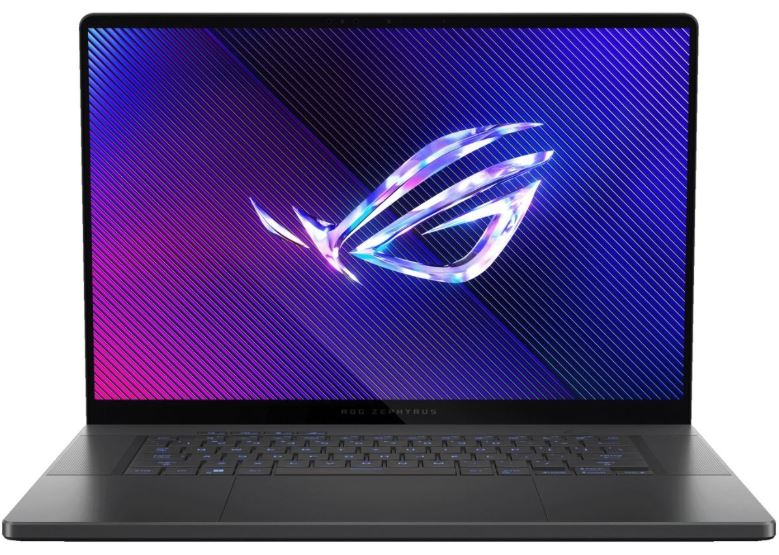
Pros: Slim and lightweight design, stunning high-refresh OLED or IPS display, excellent RTX 5070 performance, impressive battery life for a gaming laptop, and efficient cooling.
Cons: Premium price and not the most upgradeable gaming laptop.
Why It’s the Best: The Zephyrus G16 delivers an outstanding balance of portability, performance, battery life, and display quality. Whether you’re grinding Ranked or enjoying Apex casually, it’s one of the best all-around gaming laptops you can buy.
Best Budget Gaming Laptop
MSI Katana RTX 4060 (~$900–1,300)
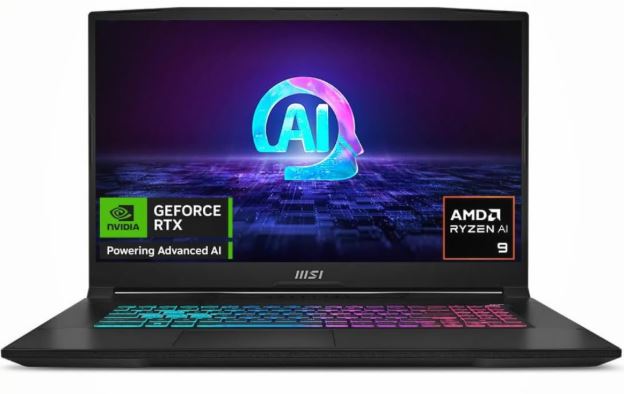
Pros: Affordable RTX 4060 performance, smooth 144Hz display, and solid gaming performance for the price.
Cons: Average battery life, louder cooling fans, and a bulkier design.
Why It’s the Best: If you’re looking for the best value under roughly $1,200, the MSI Katana delivers excellent 1080p performance in Apex Legends without stretching your budget.
Best Value Gaming Laptop
Lenovo Legion 5 (~$1,400–1,900)
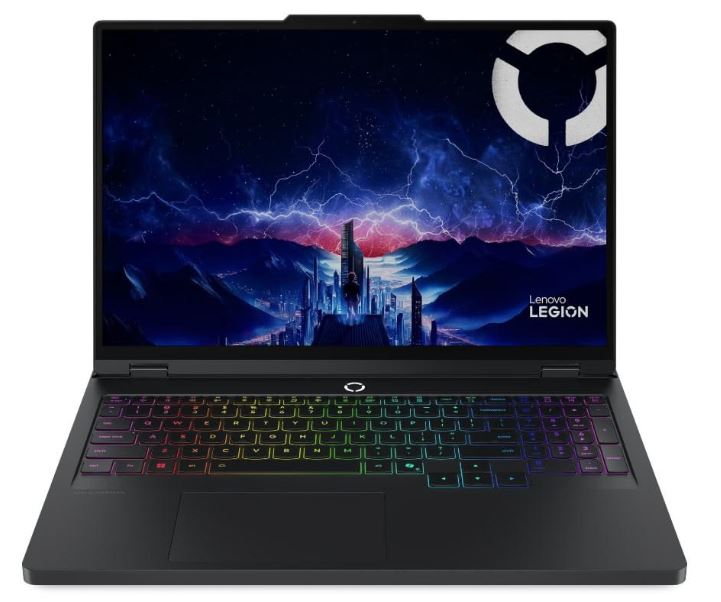
Pros: Excellent cooling, RTX 4070 configuration, high-refresh display, comfortable keyboard, and upgradeable RAM and storage.
Cons: Slightly heavier than thinner gaming laptops.
Why It’s the Best: The Legion 5 consistently offers some of the best performance-per-dollar on the market. It’s an easy recommendation for Apex players who want high FPS without paying flagship prices.
Best RTX 4070 Gaming Laptop
ASUS ROG Strix G16 (~$2,000–2,500)
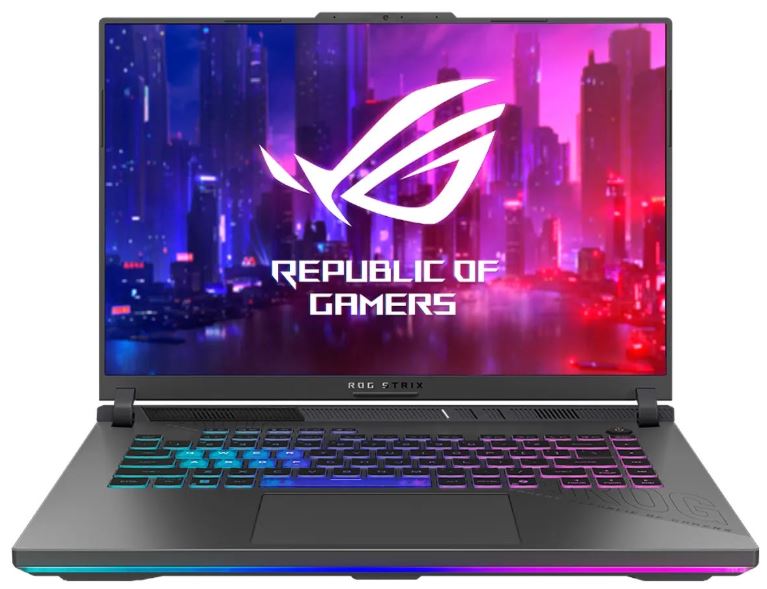
Pros: Powerful RTX 4070 graphics, excellent cooling, high-refresh display, and strong gaming performance.
Cons: Larger chassis and louder fans under heavy load.
Why It’s the Best: The Strix G16 squeezes excellent performance out of the RTX 4070, making it an outstanding choice for players targeting high FPS at 1080p or smooth 1440p gameplay.
Best Premium Gaming Laptop
Razer Blade 16 (~$3,200–4,000)
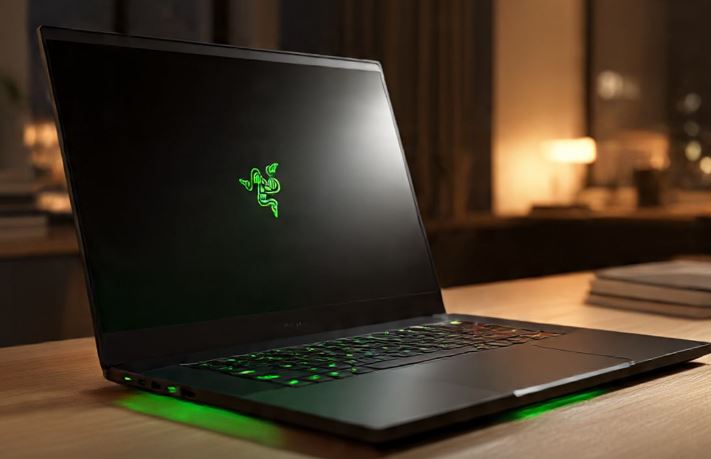
Pros: Premium CNC aluminum build, beautiful high-refresh display, top-tier hardware, and outstanding overall quality.
Cons: Very expensive and battery life drops quickly while gaming.
Why It’s the Best: If money isn’t a concern, the Razer Blade 16 combines premium craftsmanship with flagship gaming performance, making it one of the most luxurious gaming laptops available.
Best Gaming Laptop for Competitive Players
Lenovo Legion Pro 7i (~$3,000–4,500)
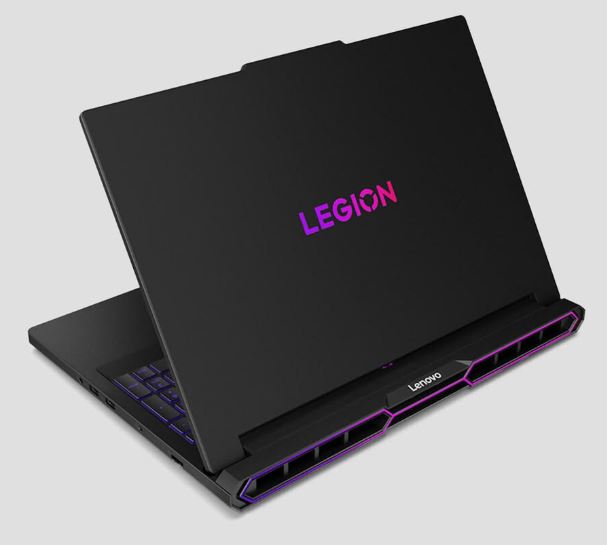
Pros: Exceptional cooling, extremely stable high FPS, powerful Intel processor, RTX 5070 options, and fast 240Hz display.
Cons: Heavier than most gaming laptops and not ideal for frequent travel.
Why It’s the Best: Competitive Apex players care about one thing above everything else—consistent frame rates. The Legion Pro 7i is built to sustain high performance during long gaming sessions, making it one of the best choices for serious Ranked grinders.
How to Choose the Right Gaming Laptop for Apex Legends
Casual Player
Recommendation: An RTX 4060 gaming laptop with a 144Hz display (~$900–1,300).
Examples: MSI Katana, Lenovo LOQ, or Acer Nitro.
If you mainly play Apex Legends for fun and don’t mind lowering a few graphics settings, an RTX 4060 laptop offers excellent 1080p performance without spending a fortune.
Ranked Grinder
Recommendation: An RTX 4070 gaming laptop with a 165Hz or 240Hz display (~$1,400–1,900).
Examples: Lenovo Legion 5 or ASUS ROG Strix G16.
If you’re constantly grinding Ranked and chasing Masters or Predator, you’ll appreciate the extra performance, smoother gameplay, and lower input lag these laptops provide.
Competitive Player
Recommendation: An RTX 5070 gaming laptop with a 240Hz or higher refresh rate (~$1,800–2,500).
Examples: Lenovo Legion Pro 7i or MSI Vector.
Competitive players should prioritize consistent frame rates, excellent cooling, and the highest refresh rate possible. A stable 240Hz experience can make tracking and fast reactions feel much smoother during intense fights.
Student
Recommendation: A slim and portable RTX 4060 or RTX 4070 gaming laptop with good battery life (~$1,200–1,800).
Examples: ASUS ROG Zephyrus G16 or Lenovo Legion Slim 5.
If you need a laptop for both school and gaming, look for something that’s lightweight enough to carry around campus while still offering enough power to enjoy Apex Legends after classes. A good balance of portability, battery life, and gaming performance will serve you much better than simply buying the most powerful laptop you can afford.
Common Mistakes When Buying a Gaming Laptop (and How to Avoid Them)
1. Buying a Gaming Laptop with a 60Hz Display
Many budget or older gaming laptops still come with a 60Hz display.
Why it’s a mistake for Apex Legends:
Apex benefits massively from high refresh rates. A 144Hz or higher display makes movement look smoother, helps you track enemies more accurately, and makes movement mechanics like tap-strafing and wall bouncing feel much more responsive.
Once you’ve experienced 144Hz, going back to 60Hz feels noticeably slower. Buying a gaming laptop with a powerful GPU but pairing it with a 60Hz screen wastes a lot of that performance.
Better approach: Prioritize a 144Hz or 165Hz display with a fast response time. If your budget allows, a 240Hz display is even better for competitive play.
2. Focusing Only on the GPU While Ignoring the CPU
Many people only look at the graphics card when buying a gaming laptop.
Why it’s a mistake for Apex Legends:
While the GPU is important, Apex Legends is also quite CPU-intensive, especially during large fights with multiple squads, abilities, and explosions happening at once. A weak processor can create bottlenecks, causing stuttering, lower 1% lows, and inconsistent frame rates.
Better approach: Pair a strong GPU with a capable processor. Modern Intel Core Ultra and AMD Ryzen 7 processors provide an excellent balance for competitive Apex Legends.
3. Buying Only 512GB of Storage
At first, 512GB sounds like plenty of storage.
Why it’s a mistake:
After installing Windows, Apex Legends, updates, and a few additional games, that storage fills up much faster than most people expect. Constantly deleting games to make space quickly becomes frustrating.
Better approach: Aim for at least a 1TB NVMe SSD. If possible, choose a laptop with an additional M.2 slot so upgrading your storage in the future is quick and easy.
4. Gaming on Battery Power
Gaming laptops automatically reduce performance when they’re running on battery.
Why it’s a mistake for Apex Legends:
You’ll experience lower FPS, reduced GPU performance, and more inconsistent frame rates. That’s the last thing you want during a Ranked match.
Better approach: Always keep your gaming laptop plugged in while playing. Enable your laptop’s Performance Mode or Turbo Mode to get the highest and most consistent performance.
5. Blocking the Cooling Vents
Using your gaming laptop on a bed, blanket, or other soft surface is a common mistake.
Why it’s a mistake:
Soft surfaces block the air vents, causing heat to build up inside the laptop. Higher temperatures lead to thermal throttling, louder fans, and lower FPS during the moments when you need stable performance the most.
Better approach: Use your laptop on a hard, flat surface. A laptop stand or cooling pad can also improve airflow, especially if you live in a warm climate.
6. Expecting Laptop Performance to Match an Equivalent Desktop
Many people assume an RTX 4070 laptop performs exactly like a desktop RTX 4070.
Why it’s a mistake:
Laptop GPUs are designed to operate within much lower power limits than desktop graphics cards. As a result, they generally deliver lower performance despite sharing the same model name. Cooling capacity and power delivery also play a major role in how well a gaming laptop performs.
Better approach: Think of a gaming laptop as a balance between performance and portability. You may not get desktop-level performance, but a well-cooled gaming laptop can still deliver an excellent Apex Legends experience with the right settings.
Conclusion
Finding the best gaming laptop for Apex Legends isn’t about buying the most expensive model with the highest specifications—it’s about choosing one that matches your budget, playstyle, and performance expectations. Whether you’re a casual player dropping into pubs after work or a competitive grinder chasing Masters or Predator, there’s a gaming laptop out there that fits your needs.
For most players, an RTX 4060 or RTX 4070 gaming laptop paired with a fast processor and a 144Hz or higher display will deliver an excellent Apex Legends experience. If you also stream, edit videos, or play the latest AAA games, investing in a more powerful laptop can give you extra performance and better longevity.
Remember, even the best gaming laptop won’t instantly make you a better player. Professional Apex players don’t rely on ultra graphics—they prioritize high frame rates, low input lag, and consistent performance because smooth gameplay wins more fights than fancy visual effects ever will.
To complete your Apex Legends setup, be sure to check out my Best Gaming Monitor for Apex Legends, Best Gaming Mouse for Apex Legends, Best Gaming Keyboard for Apex Legends, Best Gaming Headset for Apex Legends, Best Gaming Mousepad for Apex Legends, Best GPU for Apex Legends, Best CPU for Apex Legends, and Best Prebuilt Gaming PC for Apex Legends guides. Together, they’ll help you build a setup that’s optimized for higher FPS, lower input lag, and a more competitive experience in the Outlands.
Now plug in your laptop, lower those graphics settings if you need to, and remember—your goal isn’t to have the prettiest Apex Legends experience. It’s to be the last squad standing and see that “You Are the Champion” screen.
Thank you for choosing my website. Hope you found what you were looking for.