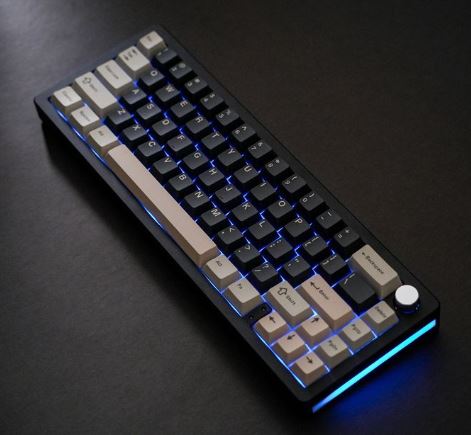
Mechanical keyboards have become incredibly popular over the last few years. What was once considered a premium enthusiast product is now more affordable and accessible than ever before. One of the biggest reasons for their popularity is their durability, customization options and excellent typing experience.
Unlike traditional membrane keyboards, many mechanical keyboards allow you to replace individual switches if they become faulty. This makes them highly cost-effective in the long run because you can replace a single switch instead of buying an entirely new keyboard. Many modern mechanical keyboards also support hot-swappable switches, allowing users to customize the feel and sound of their keyboard without any soldering.
At the $100 price point, you begin entering enthusiast territory. This is where mechanical keyboards start offering premium features such as hot-swappable switches, gasket-mounted designs, better stabilizers, wireless connectivity, premium keycaps and even Hall Effect technology on some models.
Whether you’re grinding ranked matches in Apex Legends, Counter-Strike 2 and Valorant or spending hours typing, coding and working, a quality mechanical keyboard can significantly improve your overall experience.
The good news is that you no longer need to spend hundreds of dollars to enjoy enthusiast-level features. Today, there are several excellent mechanical keyboards under $100 that deliver outstanding performance for both gaming and productivity.
Affiliate Disclosure
Some of the links in this article are affiliate links, which means I may earn a small commission if you purchase a product through one of these links, at no additional cost to you. This helps support me and allows me to continue creating gaming guides and hardware recommendations for you.
That said, what should you expect from a mechanical keyboard under $100?
What To Expect From a Mechanical Keyboard Under $100
At the $100 price range, mechanical keyboards begin offering features that were once reserved for premium enthusiast boards. This is where you’ll find better switches, stronger build quality, improved acoustics and more customization options.
Premium Mechanical Switches
The first thing you should expect is a choice between the three main mechanical switch types:
Linear Switches
Linear switches are usually identified by the color Red. They travel smoothly from top to bottom with no tactile bump or clicking sound.
Best For: FPS games such as Apex Legends, Valorant, Counter-Strike 2 and Call of Duty.
Why Gamers Love Them:
- Smooth key presses
- Fast actuation
- Quiet operation
- Excellent for rapid movement inputs
Tactile Switches
Tactile switches are most commonly represented by Brown switches. They provide a small bump during the key press without producing a loud click.
Best For: Users who both game and type regularly.
Advantages:
- Better feedback than linear switches
- Comfortable for long typing sessions
- Still suitable for gaming
Clicky Switches
Clicky switches are commonly represented by Blue switches. They provide both a tactile bump and a loud clicking sound with every key press.
Best For: Typing enthusiasts.
Advantages:
- Extremely satisfying feedback
- Easy to know when a key has registered
Downside: They can be very loud and may annoy people nearby during late-night gaming sessions.
Hot-Swappable Switches
One of the biggest upgrades you’ll find in this price range is hot-swappable support.
This allows you to remove and replace switches without soldering. If a switch becomes faulty, you can simply replace it instead of buying a completely new keyboard.
Hot-swappable keyboards also allow you to experiment with different switch types and customize the keyboard to your personal preference.
Better Build Quality
Mechanical keyboards under $100 generally offer much better build quality than entry-level models.
You can expect:
- Stronger frames
- Better stabilizers
- Less key wobble
- Reduced rattling on larger keys such as the Spacebar, Enter and Shift keys
This results in a more premium feel and a better typing experience overall.
Gasket-Mounted Designs
Many keyboards in this price range feature gasket-mounted designs.
A gasket mount uses small pieces of material between the keyboard plate and the case to absorb vibrations.
Benefits:
- Softer typing feel
- Better sound profile
- More comfortable long-term use
This feature was once exclusive to enthusiast keyboards costing several hundred dollars.
Multiple Connectivity Options
Depending on the model, you may find:
- Wired Mode
- Bluetooth
- 2.4GHz Wireless via USB Dongle
For gaming, a 2.4GHz wireless connection is usually preferred because it offers lower latency and a more stable connection than Bluetooth.
Hall Effect Technology
Some modern keyboards under $100 now include Hall Effect switches.
These switches use magnetic sensors instead of traditional mechanical contacts and offer advanced features such as:
Rapid Trigger
Rapid Trigger allows a key to reset instantly when released, enabling faster repeated movements in games.
Adjustable Actuation
Adjustable actuation lets you decide exactly how far a key must be pressed before it registers.
Both features are highly beneficial in competitive FPS games where movement precision matters.
Better Keycaps and Gaming Features
Finally, you can expect:
- Higher-quality keycaps
- N-Key Rollover
- Anti-Ghosting
- RGB Lighting
- Improved software support
N-Key Rollover ensures every key press is detected correctly, while Anti-Ghosting prevents missed inputs when multiple keys are pressed simultaneously.
Simply put, a mechanical keyboard under $100 offers a premium gaming and typing experience without requiring a premium budget.
Epomaker HE68 Lite (Best Mechanical Keyboard Under $100)
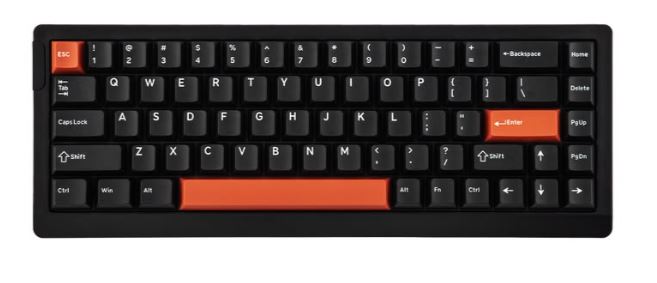
The Epomaker HE68 Lite offers one of the best combinations of gaming performance, typing comfort and enthusiast features available under $100. With Hall Effect switches, Rapid Trigger support and a gasket-mounted design, it delivers a premium experience at an affordable price.
Specifications
Layout: 65%
Switches: Hall Effect
Mount: Gasket Mount
Price: $45–$55
Features: Rapid Trigger, Adjustable Actuation, Hot-Swappable Switches, RGB Lighting
Why Buy It?
The HE68 Lite strikes an excellent balance between gaming and productivity. Its smooth Rapid Trigger implementation, comfortable typing feel and strong build quality make it one of the best-value Hall Effect keyboards currently available.
Best For: Gamers who want premium features without spending over $60.
Gamakay / NaughShark NS68 (Best Value Mechanical Keyboard)
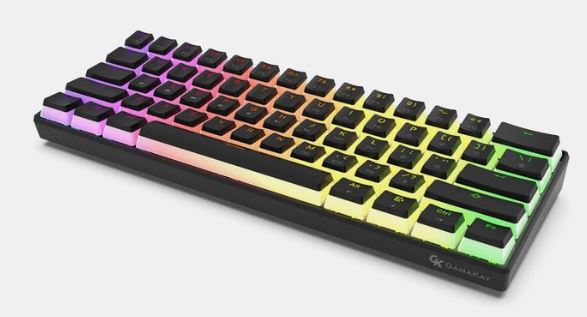
The Gamakay and NaughShark NS68 have become extremely popular among budget keyboard enthusiasts thanks to their impressive feature set and affordable pricing.
Specifications
Layout: 65% / 68%
Switches: Hall Effect
Mount: Gasket Mount
Price: $40–$52
Features: Rapid Trigger, Hot-Swappable Switches, RGB Lighting, Improved Stabilizers
Why Buy It?
The NS68 delivers excellent gaming performance, a pleasant sound profile and reliable Rapid Trigger support. It offers one of the best price-to-performance ratios in the Hall Effect keyboard market.
Best For: FPS gamers looking for maximum value.
MCHOSE Jet 75 / Ace 60 (Best Build Quality)
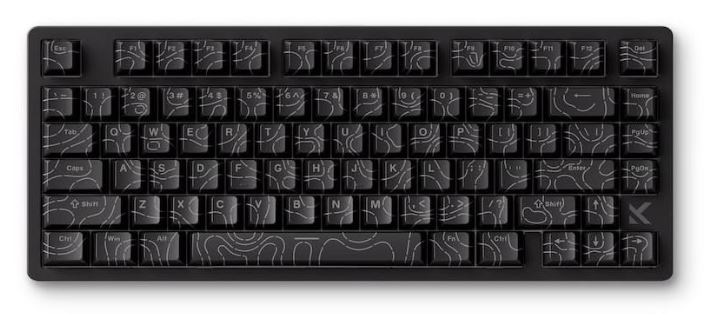
MCHOSE has quickly earned a reputation for producing keyboards that feel significantly more premium than their price suggests.
Specifications
Layout: 75% (Jet 75) or 60% (Ace 60)
Switches: Hall Effect
Mount: Gasket Mount
Price: $49–$65
Features: Rapid Trigger, Hot-Swappable Switches, Premium Stabilizers
Why Buy It?
The Jet 75 stands out thanks to its excellent construction, refined stabilizers and premium typing experience. It feels more polished than many competing keyboards within the same price range.
Best For: Users seeking better build quality and long-term durability.
Attack Shark X65H (Best Entry-Level Hall Effect Keyboard)
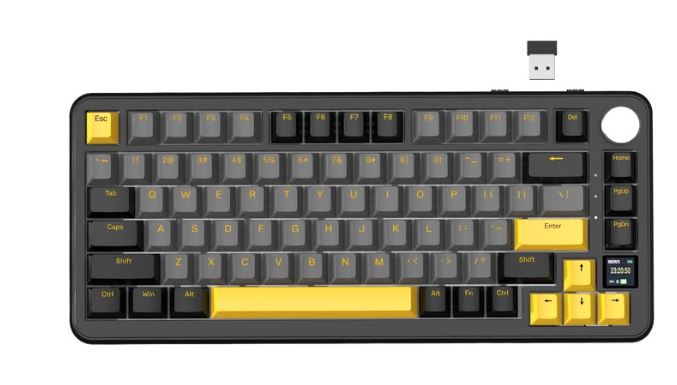
The Attack Shark X65H is one of the most affordable ways to experience Hall Effect technology without sacrificing gaming performance.
Specifications
Layout: 65%
Switches: Hall Effect
Mount: Gasket Mount
Price: $33–$45
Features: Rapid Trigger, RGB Lighting, Hot-Swappable Switches
Why Buy It?
While it lacks some of the refinement found in higher-ranked options, it still delivers excellent gaming performance and responsive Hall Effect switches at a very competitive price.
Best For: Beginners and budget-conscious gamers.
Aula Win60 HE (Best Budget Hall Effect Keyboard)
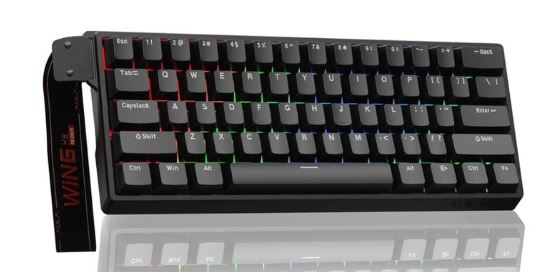
The Aula Win60 HE proves that Hall Effect keyboards no longer require a premium budget. It provides many enthusiast-focused gaming features while remaining one of the most affordable options available.
Specifications
Layout: 60%
Switches: Hall Effect
Mount: Basic Gasket / Tray Mount
Price: $39–$49
Features: Rapid Trigger, RGB Lighting, Hot-Swappable Switches
Why Buy It?
Although its build quality and acoustics aren’t quite as refined as the top three options on this list, it still delivers excellent gaming performance and responsive Hall Effect functionality.
Best For: Gamers who want Rapid Trigger features at the lowest possible cost.
Common Mistakes When Buying a Mechanical Keyboard Under $100
1. Buying Based on RGB Alone
Many buyers get attracted to keyboards with flashy RGB lighting, rainbow effects and per-key customization, then make their decision based entirely on looks.
Why It’s a Mistake
RGB lighting adds visual appeal, but it does nothing to improve your typing speed, gaming performance, sound profile or durability. Many manufacturers use RGB as a marketing tool while cutting corners on switches, stabilizers and overall build quality.
Consequences
- Paying extra for aesthetics instead of performance
- Ending up with a keyboard that feels cheap
- Regretting the purchase once the novelty wears off
Recommendation
Always prioritize switch quality, build quality and typing feel first. RGB lighting should be the final factor in your buying decision.
2. Choosing the Wrong Switch Type
One of the most frustrating mistakes gamers make is buying a keyboard without understanding the differences between switch types.
Why It’s a Mistake
Every switch type feels different and is designed for different use cases.
Linear (Red) Switches
- Smooth keypresses
- No tactile bump
- Excellent for FPS games
Tactile (Brown) Switches
- Small bump during actuation
- Good balance between gaming and typing
Clicky (Blue) Switches
- Loud click sound
- Great for typing
- Can become annoying during gaming sessions
Hall Effect Switches
- Adjustable actuation
- Rapid Trigger support
- Excellent for competitive gaming
Consequences
- Reduced comfort
- Slower reaction times
- Unnecessary fatigue
- Having to replace the keyboard sooner than expected
Recommendation
For FPS games such as Apex Legends, Valorant and Counter-Strike 2, Linear or Hall Effect switches are usually the best choice.
3. Ignoring Layout Size
Many buyers purchase a keyboard without considering how much desk space they actually need.
Why It’s a Mistake
Different layouts offer different advantages.
Full-Size
- Includes numpad
- Takes up the most desk space
TKL (Tenkeyless)
- Removes the numpad
- More room for mouse movement
75% Layout
- Compact while retaining most important keys
65% Layout
- Great balance between size and functionality
60% Layout
- Maximum desk space
- Removes function row and some navigation keys
Consequences
- Less room for mouse movement
- Uncomfortable gaming setup
- Missing keys you regularly use
Recommendation
For most FPS gamers, a 65% or 75% layout offers the best balance between gaming performance and everyday usability.
4. Overlooking Wireless Latency
Wireless keyboards have improved significantly, but not all wireless technologies perform equally.
Why It’s a Mistake
Many budget wireless keyboards rely heavily on Bluetooth connections, which generally have higher latency than dedicated 2.4GHz wireless connections.
Consequences
- Delayed key inputs
- Less responsive gameplay
- Reduced competitive performance
Recommendation
If you play competitive games, prioritize keyboards with a dedicated 2.4GHz USB dongle. Bluetooth is perfectly fine for productivity but not ideal for serious FPS gaming.
5. Ignoring Build Quality and Stabilizers
Many gamers focus entirely on switches and RGB lighting while overlooking the keyboard’s overall construction.
Why It’s a Mistake
Poor stabilizers can make large keys such as the Spacebar, Enter and Shift feel rattly and inconsistent. Cheap construction can also result in flexing, creaking and a hollow sound profile.
Consequences
- Unpleasant typing experience
- Rattling keys
- Lower durability
- Keyboard feels cheaper than it should
Recommendation
Look for keyboards that offer:
- Gasket-mounted designs
- Quality stabilizers
- Solid build materials
- Good overall weight and construction
- Hot-swappable support
A well-built keyboard with quality stabilizers will feel and sound significantly better over the long term.
Conclusion
Mechanical keyboards have come a long way over the years. Features that were once reserved for premium enthusiast keyboards costing hundreds of dollars are now available at a much more affordable price. With a budget of $100, you can enjoy premium mechanical switches, hot-swappable support, gasket-mounted designs, Hall Effect technology and even Rapid Trigger functionality.
Whether you choose the Epomaker HE68 Lite for its outstanding balance of features, the Gamakay NS68 for its incredible value, the MCHOSE Jet 75 for its premium build quality, the Attack Shark X65H for its affordability or the Aula Win60 HE for its budget-friendly Hall Effect performance, you’re getting a keyboard capable of delivering an excellent gaming and typing experience.
If you’re looking for a more affordable option, be sure to check out our Best Gaming Keyboard Under $50 (2026 Top Picks) where we cover some of the best budget gaming keyboards currently available.
To complete your gaming setup, you may also find our Best Wired Gaming Mouse Under $40 for FPS Games (2026 Guide), Best Wireless Gaming Mouse Under $40 for FPS Games (2026 Guide) and Best Gaming Mouse Under $60 for FPS Games (2026 Guide) helpful when choosing the perfect mouse for your favorite FPS games.
You can also improve your overall gaming experience with our Best Budget Gaming Mousepad for FPS Games (2026 Guide) and Best Gaming Laptop Under $1000 (2026 Guide) if you’re planning a complete setup upgrade.
At the end of the day, the best mechanical keyboard is the one that feels comfortable, matches your playstyle and helps you enjoy both gaming and productivity. Thankfully, in 2026, you no longer need to spend a fortune to get enthusiast-level performance.
Thank You 🙂