Gaming keyboards have grown tremendously in popularity over the last two decades. As gaming has become more mainstream, manufacturers have responded by producing better gaming keyboards at more affordable prices. Features that were once only available on premium keyboards can now be found on budget-friendly options.
One of the biggest mistakes many gamers make is assuming that any keyboard with RGB lighting and the word “gaming” on the box is a good gaming keyboard. While RGB lighting can improve the look of your setup, it does very little to improve your actual gaming performance. Features such as switch quality, build quality, key responsiveness and comfort are far more important.
The good news is that a budget of $50 is more than enough to get a quality gaming keyboard. Whether you play competitive FPS games such as Apex Legends, Counter-Strike 2 and Valorant or simply want a comfortable keyboard for everyday gaming, there are plenty of excellent options available.
Another advantage is that mechanical keyboards have become significantly cheaper in recent years. This means gamers no longer have to spend hundreds of dollars to enjoy the responsiveness and durability that mechanical switches provide.
In this guide, I’ll help you choose the best gaming keyboard under $50 and explain which models offer the best value for your money. But before we look at the top picks, let’s discuss what you should expect from a gaming keyboard in this price range.
Affiliate Disclosure
Some of the links in this article are affiliate links, which means I may earn a small commission if you purchase a product through one of these links, at no additional cost to you. This helps support me and allows me to continue creating gaming guides and hardware recommendations for you.
What To Expect From a Gaming Keyboard Under $50
At the $50 price range, your primary goal should be getting a gaming keyboard with mechanical switches. Mechanical keyboards offer better durability, responsiveness and overall typing feel compared to most membrane keyboards.
There are three main types of mechanical switches you should know about:
Linear Switches
Linear switches move straight down without any tactile bump or clicking sound. They feel smooth and consistent throughout the key press, making them a favorite among many competitive gamers.
Popular examples include:
- Red Switches – Light and easy to press. Excellent for FPS games and fast-paced gaming.
- Black Switches – Heavier and harder to press. Ideal for users who want to avoid accidental key presses.
If your main focus is competitive gaming, linear switches are often the most recommended option.
Tactile Switches
Tactile switches provide a small bump during the key press, allowing you to feel when the key has been registered without needing to bottom out completely.
The most popular tactile switch is:
- Brown Switches – A balanced option that works well for both gaming and typing. They provide feedback without being overly loud.
Tactile switches are often considered the best all-around choice for users who game and type regularly.
Clicky Switches
Clicky switches provide both a tactile bump and an audible click sound every time a key is pressed. They offer a satisfying typing experience but can be quite loud.
The most popular clicky switch is:
- Blue Switches – Loud, clicky and highly satisfying for typing enthusiasts.
While many people enjoy blue switches, they may not be ideal for shared spaces, voice chat or late-night gaming sessions.
Other Features You Can Expect
Gaming keyboards under $50 often include additional features such as RGB lighting, anti-ghosting and N-key rollover.
Anti-ghosting helps ensure that multiple key presses are detected correctly, while N-key rollover allows the keyboard to register every key pressed simultaneously. This is especially useful in movement-heavy FPS games such as Apex Legends, The Finals and Valorant, where multiple inputs are often pressed at the same time.
You’ll also find different keyboard sizes:
- 60% Keyboards – Compact keyboards that remove the function row, navigation cluster and numpad to maximize desk space.
- TKL (Tenkeyless) Keyboards – Remove only the numpad while keeping the function row and arrow keys.
- Full-Size Keyboards – Include every key, including the numpad.
For most FPS gamers, a 60% or TKL keyboard is often preferred because it provides more room for mouse movement.
That said, here are my top gaming keyboard picks under $50.
Redragon K552 Kumara (Best Overall Gaming Keyboard Under $50)
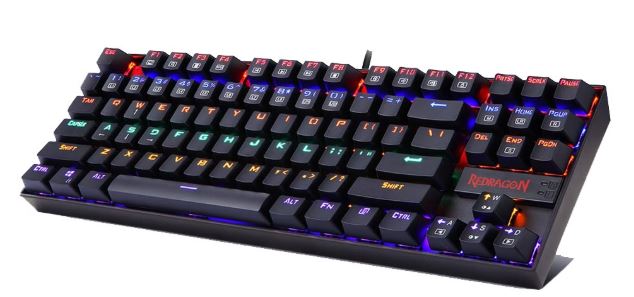
The Redragon K552 Kumara has become one of the most recommended budget gaming keyboards thanks to its excellent value, durable construction and mechanical switches. Its compact tenkeyless design gives FPS players more room for mouse movement while maintaining all the essential keys needed for gaming.
Specifications
Type: Mechanical (Red, Blue or Brown Switches)
Layout: TKL (Tenkeyless)
Features: RGB Backlighting, Metal Base, Anti-Ghosting
Price: $28–$38
Why Buy It?
The K552 delivers the mechanical keyboard experience at an affordable price. Its compact layout, responsive switches and sturdy build quality make it an excellent choice for competitive FPS gaming.
Best For: FPS gamers looking for the best overall gaming keyboard under $50.
Corsair K55 RGB Pro (Best Membrane Gaming Keyboard)
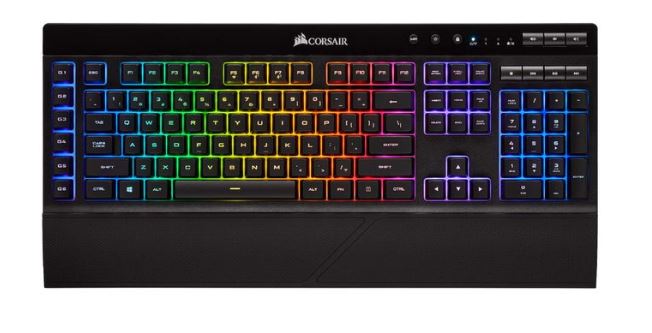
Not everyone enjoys mechanical switches, and that’s where the Corsair K55 RGB Pro shines. It offers a quieter typing experience while still providing many gaming-focused features.
Specifications
Type: Membrane
Layout: Full-Size
Features: 6-Zone RGB Lighting, Dedicated Media Controls, IP42 Water Resistance
Price: $35–$45
Why Buy It?
The K55 RGB Pro is comfortable, reliable and quiet. It is an excellent option for gamers who play in shared spaces or simply prefer softer key presses.
Best For: Gamers looking for a quiet gaming keyboard under $50.
Gamakay X65H / Attack Shark X65H (Best Hall Effect Keyboard)
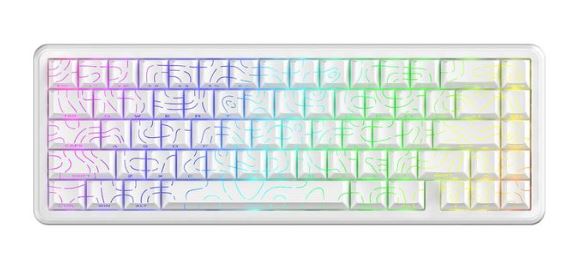
Hall Effect keyboards have become increasingly popular thanks to advanced features such as Rapid Trigger and adjustable actuation points. These features are particularly useful for competitive FPS gamers.
Specifications
Type: Hall Effect / Magnetic Switches
Layout: 65% or 75%
Features: Rapid Trigger, Adjustable Actuation, Hot-Swappable Switches
Price: $33–$45
Why Buy It?
Rapid Trigger technology allows keys to reset faster, helping improve movement precision in games such as Apex Legends, Valorant and Counter-Strike 2.
Best For: Competitive FPS players looking for modern keyboard technology on a budget.
RK Royal Kludge RK61 / RK68 (Best Wireless Gaming Keyboard)
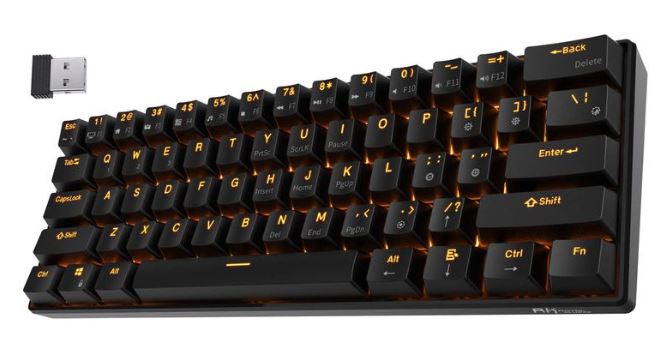
The Royal Kludge RK61 and RK68 are among the most popular budget wireless gaming keyboards available today. They combine mechanical switches, wireless connectivity and compact layouts into an affordable package.
Specifications
Type: Mechanical
Layout: 60% or 65%
Features: 2.4GHz Wireless, Bluetooth, RGB Lighting, Hot-Swappable Switches
Price: $35–$45
Why Buy It?
These keyboards offer the flexibility of both wireless and wired connectivity while maintaining excellent gaming performance. Their compact size also makes them ideal for gamers with limited desk space.
Best For: Gamers looking for an affordable wireless gaming keyboard.
Ajazz AK820 (Best Typing and Gaming Balance)
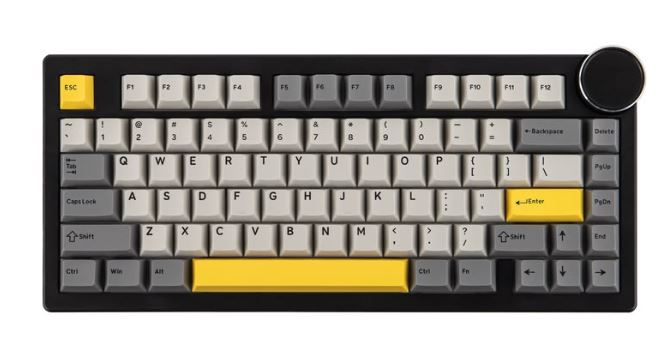
The Ajazz AK820 is designed for users who split their time between gaming and productivity. Its 75% layout provides a comfortable balance between compactness and functionality.
Specifications
Type: Mechanical
Layout: 75%
Features: Gasket Mount Design, RGB Lighting, Hot-Swappable Switches
Price: $35–$48
Why Buy It?
The gasket-mounted design provides a softer and more comfortable typing experience while still delivering excellent gaming performance. It is a fantastic all-around keyboard for both work and play.
Best For: Gamers who also spend a lot of time typing, studying or working.
Common Mistakes When Buying a Gaming Keyboard Under $50
Buying a Keyboard for RGB Lighting Alone
One of the most common mistakes gamers make is choosing a keyboard simply because it has flashy RGB lighting. While RGB can make your setup look impressive, it does very little to improve your gaming performance.
Many budget keyboards invest heavily in RGB effects while cutting corners on switch quality, build quality and durability. Always prioritize the switches, construction and overall typing experience before considering RGB lighting.
Choosing the Wrong Switch Type
Not all mechanical switches feel the same. Some gamers purchase a keyboard without understanding the differences between Linear, Tactile and Clicky switches.
For FPS games, many players prefer Red switches because they are smooth and easy to press. Brown switches offer a balanced experience for both gaming and typing, while Blue switches provide satisfying feedback but can be very loud.
Choosing the right switch type can significantly improve both comfort and performance.
Buying a Full-Size Keyboard for Competitive FPS Gaming
Full-size keyboards include a numpad, which can take up valuable desk space. For FPS gamers who use low mouse sensitivity, this often means less room for mouse movement.
Many competitive players prefer TKL (Tenkeyless) or 60% keyboards because they provide more space for large mouse movements and flick shots.
Before purchasing a keyboard, consider how much desk space you have and how you use your mouse while gaming.
Ignoring Build Quality
A keyboard may look good in pictures but feel cheap in person. Low-quality keyboards often suffer from key wobble, weak keycaps and poor durability.
Look for keyboards with solid construction, quality switches and good user reviews. Spending a little more on build quality can greatly improve the lifespan of your keyboard.
Buying Cheap Unknown Brands
While there are many excellent budget gaming keyboards available, some unknown brands focus more on marketing than quality.
Poor software support, unreliable switches and low durability are common issues with extremely cheap keyboards. Whenever possible, stick to reputable brands with a proven track record in the gaming industry.
A gaming keyboard is something you’ll use every day, so reliability should always be a priority.
Conclusion
A quality gaming keyboard can make a noticeable difference to both your gaming performance and overall comfort. Fortunately, you no longer need to spend hundreds of dollars to get responsive switches, RGB lighting and gaming-focused features. The keyboards featured in this guide prove that a budget of $50 is more than enough to build a capable gaming setup.
Whether you choose the Redragon K552 Kumara for its incredible value, the Corsair K55 RGB Pro for its quiet operation, the Gamakay X65H for its advanced Hall Effect technology, the RK Royal Kludge for wireless convenience or the Ajazz AK820 for its excellent balance of gaming and typing performance, each keyboard offers excellent value for money.
To complete your gaming setup, be sure to check out our Best Wired Gaming Mouse Under $40 for FPS Games (2026 Guide) and Best Wireless Gaming Mouse Under $40 for FPS Games (2026 Guide). Pairing a quality gaming keyboard with a reliable gaming mouse can significantly improve your overall gaming experience.
If you’re building a complete FPS setup, you may also find our Best Budget Gaming Mousepad for FPS (2026 Guide) and Best Budget Gaming Headset for FPS (2026 Guide) helpful for finding the right accessories without overspending.
For gamers looking to upgrade their entire system, our Best Gaming Laptop Under $1000 (2026 Guide), Best Gaming Laptop Under $1500 (2026 Guide) and Best Gaming Setup Under $800 (2026 Budget Guide) provide excellent recommendations for a wide range of budgets.
At the end of the day, the best gaming keyboard is the one that feels comfortable, responsive and enjoyable to use. By choosing one of the keyboards in this guide, you’ll be getting a gaming peripheral capable of serving you well for years to come.