When you’ve been gaming for a while and decide to start streaming or creating content, investing in a webcam is one of the best upgrades you can make. Showing your face helps viewers connect with you on a personal level because they get to see your reactions, personality and emotions while you play. This creates a more engaging viewing experience than gameplay alone.
While there are successful faceless content creators, channels that include a face camera often build a stronger personal connection with their audience, making it easier to grow a loyal community over time.
Fortunately, you don’t need an expensive camera to get started. With a budget of under $50, you can buy a webcam that delivers clear Full HD video, performs well in low-light conditions and includes useful features such as adjustable mounting and plug-and-play USB connectivity. These webcams are perfect for streaming on Twitch, creating YouTube content, chatting with friends on Discord and attending online meetings through Zoom or Microsoft Teams.
Affiliate Disclosure
Some of the links in this article are affiliate links, which means I may earn a small commission if you purchase a product through one of these links, at no additional cost to you. This helps support me and allows me to continue creating gaming guides and hardware recommendations for you.
That said, what should you expect from a webcam under $50?
What To Expect From a Webcam Under $50
Gaming webcams under $50 typically offer Full HD (1080p) resolution, producing much sharper and clearer video than the built-in webcams found on most laptops. This makes a noticeable difference when streaming on Twitch, recording YouTube videos or chatting with friends on Discord.
Most webcams in this price range record at 30 frames per second (30 FPS), providing smooth video for live streaming, video calls and online meetings. While you won’t get ultra-smooth 60 FPS recording at this budget, 30 FPS is more than enough for beginners and casual content creators.
Some webcams include autofocus, which automatically keeps your face sharp as you move around, while others use high-quality fixed focus that works well when you’re sitting at a consistent distance from the camera.
You can also expect better low-light performance than a typical laptop webcam. Although these webcams perform well indoors, using proper lighting such as a desk lamp or ring light will significantly improve your video quality.
Most webcams also feature plug-and-play USB connectivity, allowing you to connect them to your PC or laptop without installing complicated software. They are compatible with popular applications such as Twitch, YouTube, Discord, Zoom and Microsoft Teams.
Many models include a built-in microphone, which is suitable for casual video calls. However, if you plan to stream or create content regularly, a dedicated microphone will provide much better audio quality. You can read our Best Gaming Microphone for Gaming and Streaming Under $50 (2026 Guide) for some excellent budget microphone recommendations.
Finally, expect webcams in this price range to include adjustable universal mounting clips, making it easy to attach them securely to monitors, laptops or tripods for the best camera angle.
1. NexiGo N60 (Best Overall Budget Pick)
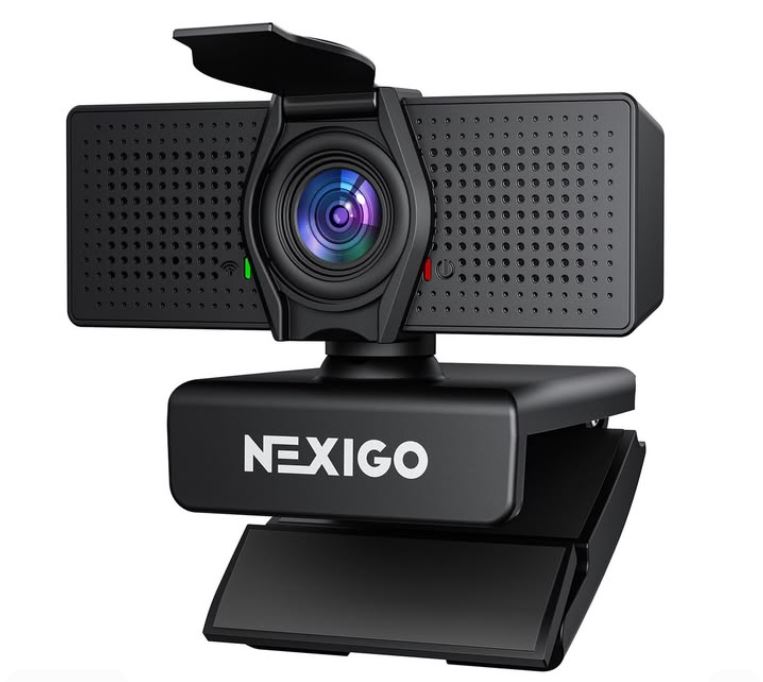
With an approximate price of $25–$35, the NexiGo N60 offers outstanding value for money. It features 1080p Full HD resolution at 30 FPS, a 110° wide field of view, autofocus, a built-in microphone, privacy cover, and automatic light correction. It delivers sharp video quality, reliable plug-and-play performance and works seamlessly with streaming software like OBS and Streamlabs. The wide field of view is great for showing more of your gaming setup, while autofocus helps keep your face sharp during streams. Although its low-light performance is average, it performs very well under normal room lighting, making it an excellent upgrade over most built-in laptop webcams.
Best For: Beginners looking for the best value webcam under $50.
2. Logitech C920 / C922 (Most Reliable Classic)
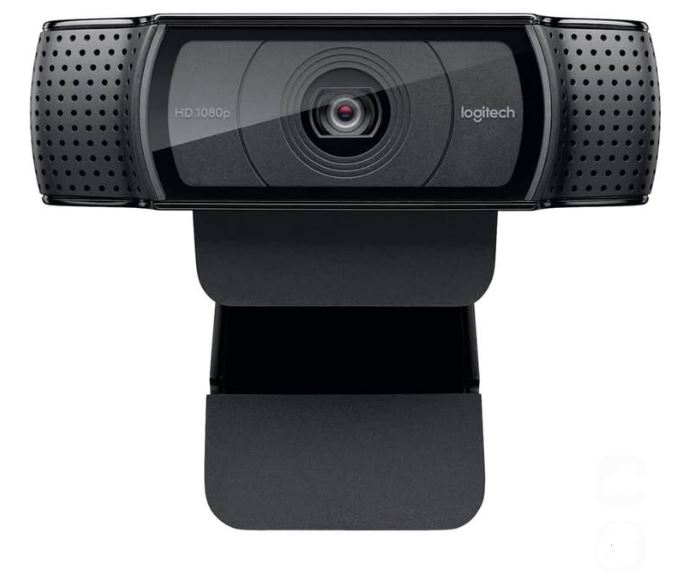
Priced at around $40–$50 (often cheaper during sales), the Logitech C920 and C922 remain some of the most trusted webcams available. They offer 1080p Full HD recording, autofocus, RightLight 2 low-light correction, dual built-in microphones, and a durable monitor mounting clip. The C922 also supports 720p at 60 FPS, making motion appear smoother during gameplay. Logitech’s excellent color reproduction and dependable software support make these webcams a favorite among streamers who simply want a camera that works every time.
Best For: Gamers and streamers who value reliability and consistent image quality.
3. EMEET SmartCam C950 / C960 (Best Value with Accessories)
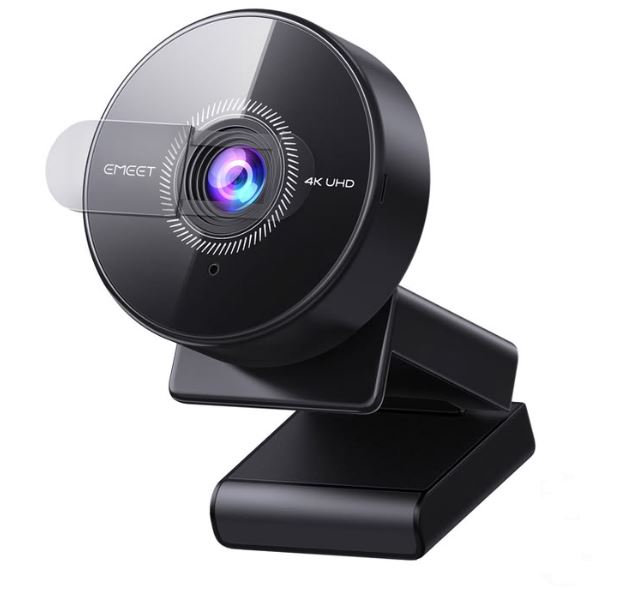
Selling for approximately $25–$40, the EMEET C950 and C960 provide excellent value for beginners. They feature 1080p Full HD recording, a built-in microphone, privacy shutter, good viewing angles and, depending on the bundle, may include useful accessories such as a tripod or mounting kit. These webcams produce natural-looking colors and respectable image quality in well-lit rooms, making them ideal for first-time streamers and content creators building a setup on a budget.
Best For: Users looking for a complete webcam package without spending extra on accessories.
4. Anker PowerConf C200 (Best Image Quality)
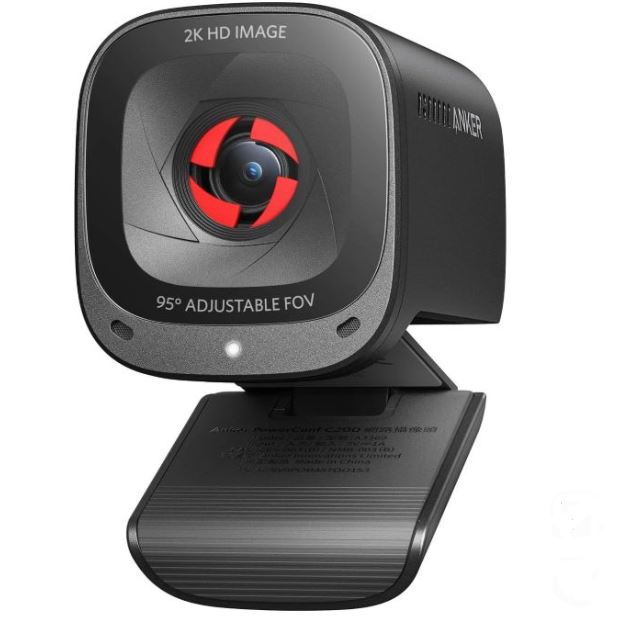
Usually available for around $40–$50, the Anker PowerConf C200 stands out thanks to its impressive image quality. It offers 1080p Full HD (with higher-resolution sensor support), fast autofocus, excellent low-light performance, noise-reducing built-in microphones, and a compact premium design. The camera produces sharp, well-balanced images with accurate colors, making it one of the best choices for facecams, video calls and beginner content creation.
Best For: Streamers who prioritize sharp video quality and excellent low-light performance.
5. Logitech Brio 100 (Best Beginner-Friendly Webcam)
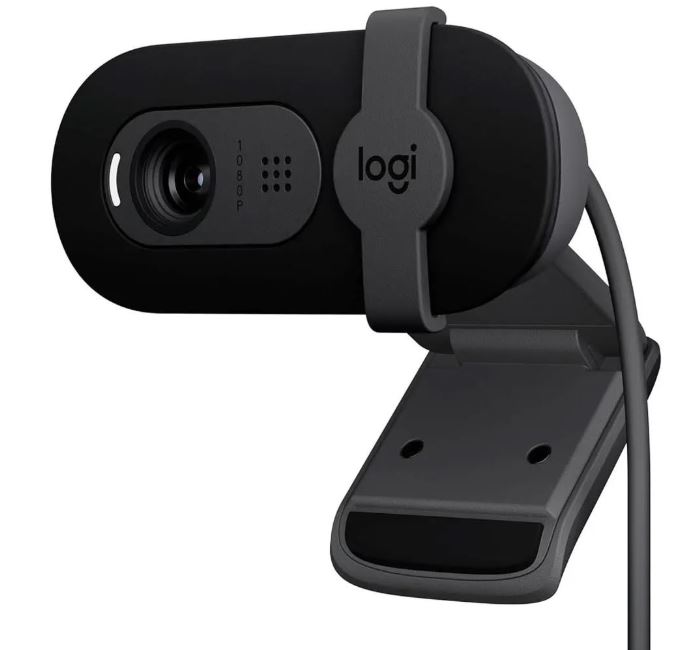
With an approximate price of $30–$45, the Logitech Brio 100 is an excellent entry-level webcam from one of the most trusted brands in the industry. It offers 1080p Full HD at 30 FPS, a built-in microphone, a privacy shutter, plug-and-play USB connectivity and reliable Logitech software support. While it doesn’t include advanced streaming features, it delivers dependable video quality and simple setup, making it a great choice for beginners.
Best For: New streamers, students and anyone looking for a simple, reliable webcam from a trusted brand.
Common Mistakes When Buying a Webcam Under $50
1. Buying a 4K Webcam When You Only Stream in 1080p
Many first-time buyers assume that purchasing a 4K webcam will instantly improve their streams or videos. In reality, if you’re streaming or recording in 1080p, the extra money spent on a 4K webcam often provides very little noticeable improvement. Higher-resolution webcams also require better lighting, more storage space and greater processing power to perform at their best.
Recommendation: Unless you specifically create 4K content, a quality 1080p webcam such as the Logitech C920 or Logitech C922 is more than enough for gaming, streaming and video calls.
2. Ignoring Proper Lighting
One of the biggest mistakes beginners make is focusing entirely on the webcam while overlooking the importance of lighting.
Poor lighting can make even an expensive webcam produce dark, grainy or noisy footage. On the other hand, a budget webcam paired with good lighting can produce surprisingly professional-looking results.
Recommendation: Invest in a small ring light, desk lamp or softbox. Proper lighting often has a greater impact on image quality than upgrading to a more expensive webcam.
3. Placing the Webcam Too Low
Camera placement plays a significant role in how you appear on stream or during video calls.
Positioning your webcam below your face—such as on a desk or beneath your monitor—creates an unnatural upward angle that is generally unflattering and less engaging for viewers.
Recommendation: Position your webcam at eye level or slightly above your monitor. This creates a more natural perspective and gives your videos a cleaner, more professional appearance.
4. Using the Webcam’s Built-in Microphone
Although most webcams include a built-in microphone, they are designed primarily for convenience rather than high-quality audio.
Built-in microphones often capture keyboard clicks, mouse movements, PC fans and other background noise, resulting in thin or muffled voice recordings.
Recommendation: Pair your webcam with a dedicated USB gaming microphone for significantly better voice quality. If you’re on a budget, check out our Best Gaming Microphone Under $50 (2026 Guide) for excellent affordable options.
5. Ignoring Privacy Features
Many people overlook webcam privacy until it’s too late.
Modern webcams remain connected to your computer whenever they’re plugged in, and although unauthorized webcam access is uncommon, it’s still a good security practice to physically block the camera when it’s not in use.
Recommendation: Choose a webcam that includes a built-in privacy shutter, or use a simple webcam cover to protect your privacy whenever the camera isn’t being used.
Conclusion
A dedicated webcam is one of the easiest and most affordable upgrades you can make if you’re planning to stream, create YouTube videos or simply communicate more professionally during Discord calls and online meetings. While built-in laptop webcams are convenient, they can’t match the image quality, clarity and flexibility offered by a dedicated webcam.
The good news is that you don’t need to spend a fortune to get started. With a budget of under $50, you can find webcams that deliver crisp 1080p Full HD video, reliable autofocus, improved low-light performance and simple plug-and-play connectivity. Whether you choose the NexiGo N60 for its outstanding value, the Logitech C920/C922 for proven reliability or the Anker PowerConf C200 for its excellent image quality, every webcam on this list is a significant upgrade over a standard laptop camera.
To take your streaming setup even further, pair your webcam with a dedicated microphone. Be sure to check out our Best Gaming Microphone Under $100 (2026 Guide) for microphones that will dramatically improve your voice quality during streams, Discord calls and content creation.
You may also be interested in our Best Gaming Headset for FPS Games (2026 Guide), Best Gaming Mouse Under $100 for FPS Games (2026 Guide), Best Mechanical Keyboard Under $100 (2026 Guide) and Best Gaming Mousepad for FPS Games (2026 Guide) to complete your gaming and streaming setup.
At the end of the day, the best webcam is the one that fits your budget, delivers clear and consistent video quality, and meets your streaming or content creation needs. Every webcam featured in this guide offers excellent value for money and is capable of helping you look more professional on Twitch, YouTube, Discord and other video platforms without exceeding your budget.