Introduction
In FPS games, I like to think of the keyboard as your movement, and the mouse as your vision.
While the mouse controls where you aim, the keyboard controls how you move, strafe, and position yourself in-game. That makes it just as important as your mouse—especially for fps games.
However, many players new to PC gaming overlook the keyboard and settle for cheap, generic options without understanding how it affects performance.
In reality, a good gaming keyboard can improve your movement responsiveness, Input consistency and your overall control in fast-paced situations
This is especially important in games like Valorant, Counter-Strike 2, and Apex Legends. In apex legends (from personal experience) when you actually want to be a movement player, your keyboard is very important for techs like Neo Strafing, ras strafing and finally super glide even though in the recent season free mantle boost has been implemented super gliding is still superior. So it’s best to get yourself a solid budget gaming keyboard
In this guide, you’ll learn what to look for in a gaming keyboard and discover the best budget gaming keyboards for FPS games based on real performance.
Affiliate Disclosure
Some of the links in this article are affiliate links, which means I may earn a small commission if you purchase a product through one of these links, at no additional cost to you. This helps support me and allows me to continue creating gaming guides and hardware recommendations for you.
What to look for in a Gaming Keyboard.
Choosing the right gaming keyboard can improve your movement, reaction time, and overall performance in FPS games.
Here are the key factors to consider:
Switch Type
The switch type is one of the most important aspects of a gaming keyboard.
There are three main types:
Mechanical Keyboards (Recommended)
Mechanical keyboards are the most popular choice for FPS gaming due to their fast response time, durability, and customization.
They come with different switch types:
- Linear switches (e.g., Red)
Smooth and quiet with no tactile bump
Best for FPS gaming and fast inputs - Tactile switches (e.g., Brown)
Slight bump feedback
Good balance between gaming and typing - Clicky switches (e.g., Blue)
Audible click with tactile feedback
Not ideal for FPS (can be distracting)
Optical Keyboards
Optical keyboards use light-based actuation, resulting in extremely fast response times (as low as ~0.2ms).
However, in real gameplay, the difference between optical and mechanical switches is not noticeable for most players. because human’s reaction time averages 250ms so anything as low as 0.2 is an overkill.
Membrane Keyboards (Not Recommended)
Membrane keyboards use a rubber layer under the keys.
- Slower response
- Less durable
- Less precise
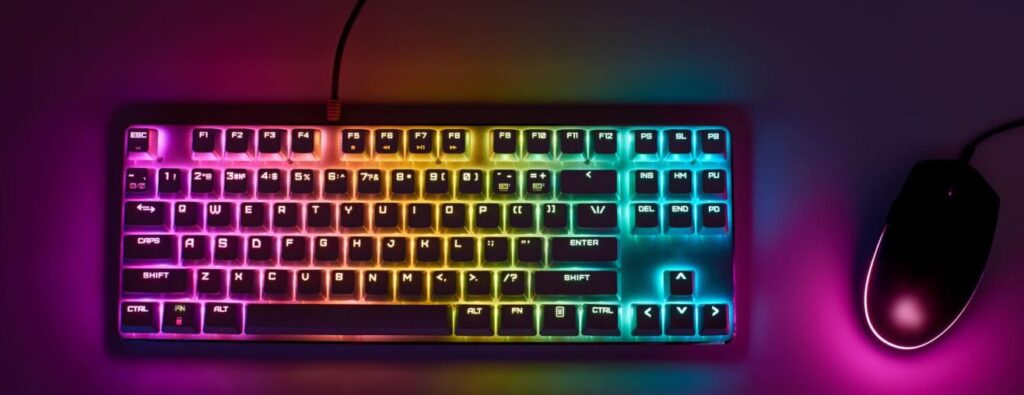
These are not ideal for competitive FPS games, even if they look like “gaming” keyboards. A lot of generic cheap keyboards with fancy customizable RGB are mostly membrane keyboards. I know this because I have fallen into that trap before, they even come with weird mice in the box.
Key Response Time
Response time refers to how quickly your keypress is registered in-game.
- Mechanical keyboards → ~5ms (fast enough)
- Optical keyboards → even faster
In practice, both are fast enough—skill and consistency matter more than tiny differences.
Build Quality
Build quality affects durability and long-term performance.
Look for:
- Solid construction (preferably metal or aluminum top plate)
- Minimal key wobble
- Stable feel when typing
Cheap plastic keyboards are more likely to wear out quickly.
Size (Form Factor)
Keyboard size affects your desk space and mouse movement:
- Full Size (100%) Includes numpad → takes more space
- TKL (Tenkeyless) No numpad → more room for mouse movement
- 60% Keyboard Compact → maximum mouse space
For FPS players, TKL or 60% is usually the best choice. You don’t your mouse slamming your keyboard when you try doing some 360 no scope with your sniper right?
Wired vs Wireless
Wired keyboards:
- Stable connection
- No input delay concerns
- Most reliable for competitive gaming
Wireless keyboards:
- Cleaner setup
- Slightly less consistent (in budget range)
For FPS gaming, wired keyboards are generally the safer option.
Best Budget Gaming Keyboards for FPS
Redragon K552 Kumara
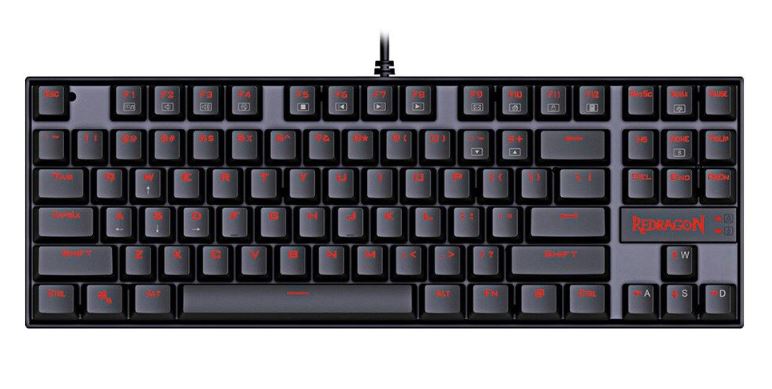
The Redragon K552 Kumara is one of the best entry-level mechanical keyboards for FPS gaming.
It features a TKL layout, giving you more mouse space while keeping essential keys like arrows and function keys.
Features:
- Wired connection
- Mechanical switches (Outemu Red / Blue)
- TKL layout (no numpad)
- Solid metal plate build
Pro:
- No software required
- Easy to customize/mod
- Strong build quality
- Red linear switches are great for FPS
Cons:
- Blue switches are very loud
- No RGB lighting
- Uses older Micro USB
RK61 (Royal Kludge)
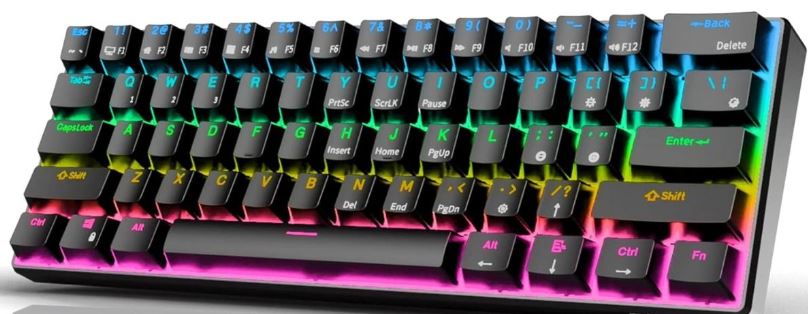
The RK61 is a compact 60% keyboard designed for players who want maximum desk space.
Features:
- Wired + Bluetooth support
- Mechanical switches
- 60% compact layout
- Software support
Pro:
- Compact design (great for FPS)
- Supports both wired and wireless
- Premium-feeling keycaps (Cherry profile)
Cons:
- No dedicated arrow or function keys
- Keycaps can wear/shine over time
Logitech G413 TKL SE
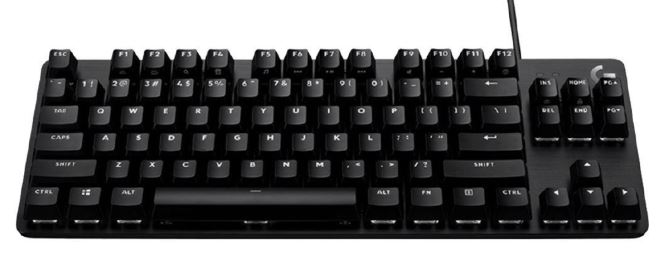
The Logitech G413 TKL SE offers a more premium build with a clean design and solid performance. I personally vouch for this keyboard, literally wrote this article with this keyboard. Key press feels so good even though it doesn’t have RGB, the white light is enough. Has premium feel, brown switches (tactile) and overall I love this keyboard.
Features:
- Wired connection
- Tactile mechanical switches
- Aluminum top plate
- TKL layout
Pros:
- Premium build quality
- Reliable tactile switches
- Includes arrow and function keys
Cons:
- Only white backlighting
- Micro USB cable
Razer Ornata V3 X
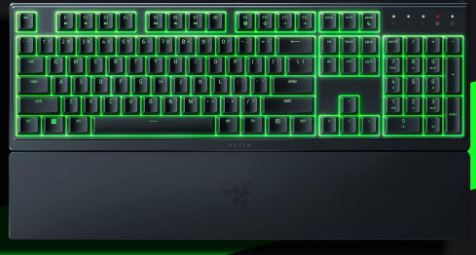
The Razer Ornata V3 X is a budget keyboard that uses hybrid “mecha-membrane” switches.
Features:
- Wired connection
- Low-profile design
- RGB lighting
- Razer Synapse support
Pros:
- Clean, premium look
- Quiet typing experience
- Good software support
Cons:
- Not true mechanical switches
- Low-profile feel may not suit FPS gaming
- Can experience ghosting
SteelSeries Apex 3
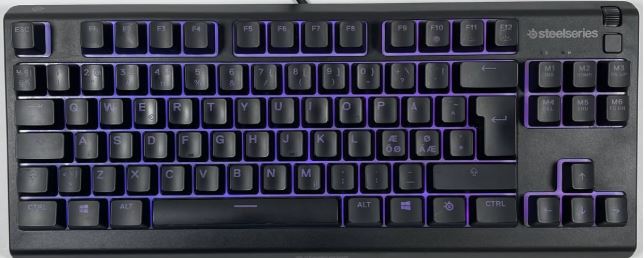
The SteelSeries Apex 3 is a membrane keyboard focused more on comfort and aesthetics.
Features
- Wired connection
- Full-size layout
- Membrane switches
- RGB lighting
- Water resistance
Pros
- Very quiet
- Water-resistant
- Good RGB lighting
Cons
- Not ideal for competitive FPS
- Slower, “mushy” key feel
- Large size limits mouse space
- Software can feel heavy
Which Keyboard Should You Choose?
Best Overall — Redragon K552 Kumara
The Redragon K552 Kumara is the best overall choice for FPS gaming on a budget.
Why:
- True mechanical switches
- Solid metal build
- TKL layout (perfect balance of space + functionality)
It’s widely known as one of the best entry-level mechanical keyboards, offering great performance for the price
Best for:
- Competitive FPS players
- First-time mechanical keyboard users
- Balanced performance + durability
To improve your aim alongside movement, pairing this with the best budget gaming mouse for FPS is essential.
Best Compact (FPS Focus) — RK61 (Royal Kludge)
The RK61 is ideal if you want maximum mouse space.
Why:
- 60% layout = more room for aiming
- Wireless + wired flexibility
- Premium feel for the price
Best for:
- Low sensitivity players
- Clean, minimal setups
- Desk space optimization
Best Premium Budget — Logitech G413 TKL SE
The Logitech G413 TKL SE gives you a more premium feel without going expensive.
Why:
- Aluminum build
- Reliable tactile switches
- Clean, professional look
Best for:
- Players who want durability + brand reliability
- Mixed use (gaming + typing)
Budget Aesthetic Option — Razer Ornata V3 X
The Razer Ornata V3 X is more about looks and comfort than performance.
Why:
- Quiet typing
- RGB + slim design
Best for:
- Casual gamers
- Quiet setups
Not ideal for competitive FPS due to membrane feel
Not ideal for competitive FPS due to membrane feel
The SteelSeries Apex 3 is not a strong choice for FPS gaming.
Why:
- Membrane switches = slower response
- Full-size layout = less mouse space
Best for:
- Casual use
- Quiet typing
Avoid if your focus is competitive FPS performance
Final Verdict
- Best overall → K552 Kumara
- Best for FPS space → RK61
- Best premium feel → G413 TKL SE
Conclusion
Choosing the best budget gaming keyboard for FPS games can make a real difference in how you move, react, and perform in-game. You may think the mouse is only for aiming, but the keyboard also helps. Techs like mirror and counter strafing also help reduce recoil in fast paced tracking intensive games like Apex Legends, The Finals and CS2
From this guide, it’s clear that mechanical keyboards offer the best performance for FPS gaming. Options like the Redragon K552, Kumara and RK61 provide fast, consistent inputs without costing too much, making them ideal for budget players who still want a competitive edge.
The most important thing to remember is this:
You don’t need an expensive keyboard to improve your gameplay.
What matters is choosing a keyboard that fits your playstyle—whether that’s a compact layout for more mouse space or a tactile feel for better control—and sticking with it to build consistency over time.
Once you find the right keyboard, combine it with proper settings and practice, and you’ll notice a real improvement in your movement and overall performance. And if you also need a gaming mouse to pair your keyboard with, you’re in luck. I have written the Best Wireless Gaming Mouse Under $40 for FPS Games and the Best Wired Gaming Mouse Under $40 for FPS Games.
Wait, you also want some picks for $1000 gaming laptop, for your kid’s birthday present? The check out Best Gaming Laptop Under $1000 okay so maybe your not a parent but you want to get yourself an affordable laptop, luckily I have written an article on the Best Gaming Laptops Under $800 for Apex Legends.
As always, I appreciate you making time to read my article and hope you enjoy using the keyboard I recommended. I wrote this article for people like you. Thank You Very Much!