Over the last decade, wireless technology has improved dramatically. In the past, many gamers avoided wireless gaming mice because they suffered from higher latency, connection issues and shorter battery life. As a result, wired gaming mice were considered the superior choice for competitive gaming.
Today, things are very different. Modern wireless gaming mice are faster, more reliable and capable of competing directly with wired gaming mice in terms of performance. In fact, many professional esports players now use wireless gaming mice thanks to their excellent responsiveness and freedom of movement.
One of the biggest advantages of a wireless gaming mouse is the lack of cable drag. Without a cable attached, your movements feel more natural and unrestricted, which is especially beneficial for FPS gamers who use low sensitivity settings and rely on large mouse movements for aiming.
Wireless gaming mice have also become significantly more affordable. What was once considered a premium luxury is now available to budget-conscious gamers thanks to advancements in manufacturing and wireless technology. Battery life has improved as well, with many modern gaming mice capable of lasting days or even weeks on a single charge.
The best part is that you no longer need to spend a fortune to enjoy a quality wireless gaming experience. At the $40 price point, there are several excellent wireless gaming mice that offer reliable performance, accurate sensors and low latency suitable for competitive FPS gaming.
Before we look at the best wireless gaming mice under $40, let’s discuss what you should expect from a gaming mouse in this price range.
Affiliate Disclosure
Some of the links in this article are affiliate links, which means I may earn a small commission if you purchase a product through one of these links, at no additional cost to you. This helps support me and allows me to continue creating gaming guides and hardware recommendations for you.
What To Expect From a Wireless Gaming Mouse Under $40
Modern wireless gaming mice have improved significantly over the years, and even at the $40 price point you can expect features that were once reserved for premium gaming peripherals.
One of the most important features is a low-latency 2.4GHz wireless connection. Unlike standard Bluetooth connections, 2.4GHz wireless technology uses a dedicated USB receiver to provide a faster and more stable connection. This allows the mouse to feel nearly identical to a wired gaming mouse, making it suitable for competitive FPS games such as Apex Legends, Counter-Strike 2 and Valorant.
You should also expect a quality optical gaming sensor capable of delivering accurate tracking and consistent performance. Most wireless gaming mice in this price range offer adjustable DPI settings, allowing you to customize sensitivity based on your preferred games and playstyle.
Another feature commonly found in budget wireless gaming mice is a 1000Hz polling rate. This means the mouse communicates with your PC up to 1,000 times per second, helping create a smooth and responsive gaming experience.
Many modern wireless gaming mice are also surprisingly lightweight. Since competitive gamers often prefer lighter mice for faster flicks and easier tracking, manufacturers have focused on reducing weight without sacrificing performance or battery life.
Finally, battery life has improved dramatically. Most wireless gaming mice under $40 can easily last through multiple gaming sessions before needing to be recharged, while some models can operate for days or even weeks depending on usage.
Simply put, a wireless gaming mouse under $40 may not include every premium feature found on flagship models, but it can still provide the responsiveness, accuracy and reliability needed for competitive FPS gaming.
Mchose G3 V2 Pro (Best Overall Wireless Gaming Mouse Under $40)
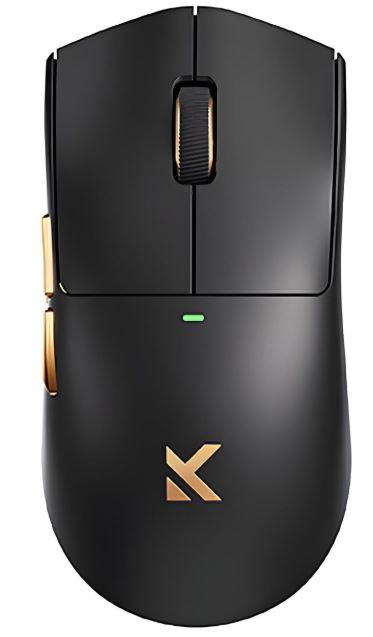
The Mchose G3 V2 Pro has quickly become one of the most impressive budget wireless gaming mice on the market. Featuring a lightweight design, excellent sensor performance and multiple connectivity options, it delivers performance that rivals mice costing significantly more.
Specifications
Sensor: PAW3395 or PAW3311 Optical Sensor
Weight: 59g
Connectivity: 2.4GHz Wireless, Bluetooth, Wired
Battery: 800mAh (Up to 80 Hours)
Price: $25–$50
Why Buy It?
The combination of a lightweight design, reliable sensor and low-latency wireless connection makes the G3 V2 Pro an outstanding choice for FPS games. Its symmetrical shape works particularly well for claw grip and fingertip grip users.
Best For: Gamers looking for the best overall wireless gaming mouse under $40.
Logitech G305 LIGHTSPEED (Most Reliable Wireless Gaming Mouse)
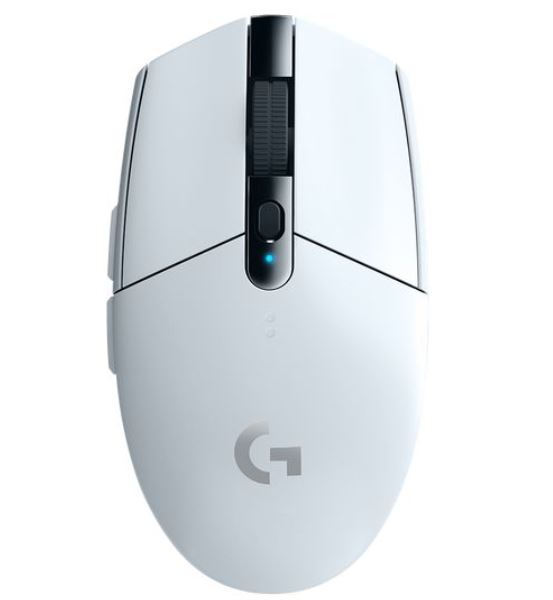
The Logitech G305 LIGHTSPEED has earned its reputation as one of the best budget wireless gaming mice ever made. Even years after its release, it remains a favorite among competitive gamers thanks to its excellent sensor and dependable wireless performance.
Specifications
Sensor: HERO 12K Optical Sensor
Weight: 99g
Connectivity: LIGHTSPEED 2.4GHz Wireless
Battery: Up to 250 Hours
Price: $30–$40
Why Buy It?
The G305 delivers proven wireless performance with excellent tracking accuracy and outstanding battery life. If reliability is your top priority, this mouse remains one of the safest purchases available.
Best For: Gamers who want proven wireless performance from a trusted brand.
Redragon M686 Vampire Elite (Best Feature-Packed Wireless Mouse)
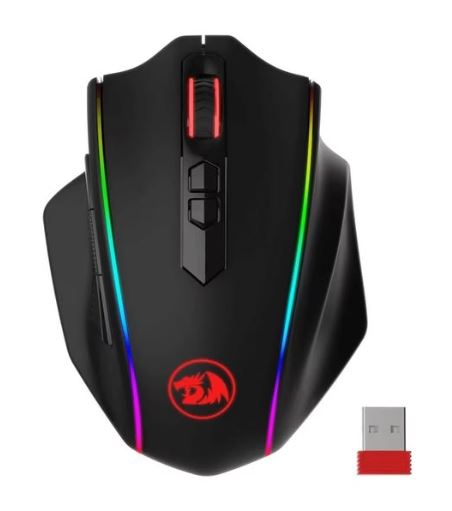
The Redragon M686 Vampire Elite offers an impressive list of features while remaining affordable. With programmable buttons, RGB lighting and both wired and wireless connectivity, it provides excellent versatility for gamers.
Specifications
Sensor: High-Precision Optical Sensor
Weight: 80–90g
Connectivity: Wireless and Wired
Buttons: 8 Programmable Buttons
Why Buy It?
The M686 combines solid gaming performance with customization features rarely found at this price point. It is an excellent option for gamers who want extra buttons and RGB lighting without spending a fortune.
Best For: Gamers who want maximum features on a budget.
SteelSeries Rival 3 Wireless (Best Battery Life)
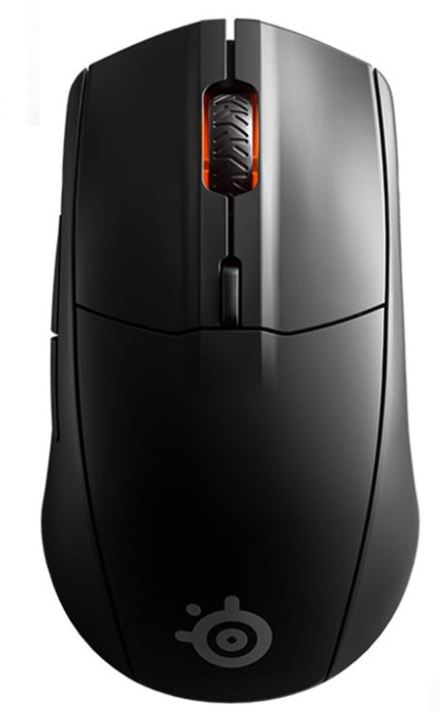
The SteelSeries Rival 3 Wireless focuses on delivering dependable performance and exceptional battery life. It remains a popular option for gamers who want a wireless mouse that can last for months before needing new batteries.
Specifications
Sensor: TrueMove Air Optical Sensor
Weight: 80–90g
Connectivity: 2.4GHz Wireless and Bluetooth
Battery Life: Up to 400+ Hours
Price: $35–$50 (Frequently Discounted)
Why Buy It?
The Rival 3 Wireless combines reliable tracking performance with some of the best battery life available in the budget category. It’s an excellent choice for gamers who dislike frequent charging.
Best For: Gamers who prioritize battery life and reliability.
Razer Basilisk V3 X HyperSpeed (Best Ergonomic Wireless Mouse)
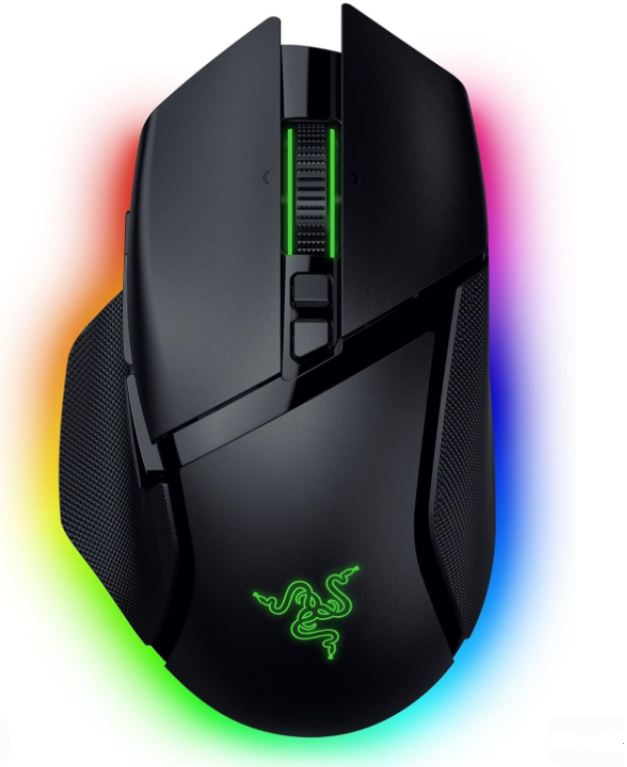
The Razer Basilisk V3 X HyperSpeed brings Razer’s well-known ergonomic design to the budget wireless gaming mouse market. Its comfortable shape makes it an excellent choice for long gaming sessions.
Specifications
Sensor: Razer 5G Optical Sensor
Weight: Lightweight Ergonomic Design
Connectivity: HyperSpeed Wireless
Features: RGB Lighting, Programmable Buttons
Price: $30–$40 (On Sale)
Why Buy It?
The Basilisk V3 X HyperSpeed offers responsive clicks, reliable wireless performance and excellent comfort. Its ergonomic shape is particularly appealing to gamers who prefer palm grip or relaxed claw grip styles.
Best For: Gamers looking for comfort and ergonomics.
Common Mistakes When Buying a Wireless Gaming Mouse Under $40
Ignoring Battery Life
One of the biggest advantages of a wireless gaming mouse is convenience. Unfortunately, many buyers focus entirely on performance and forget to consider battery life.
A wireless mouse with poor battery life may require frequent charging or battery replacements, which can quickly become frustrating during long gaming sessions. Some budget wireless mice only last a few dozen hours on a charge, while others can last hundreds of hours.
Before making a purchase, check the manufacturer’s battery life claims and read user reviews. A longer-lasting battery means less downtime and a better overall gaming experience.
Buying Bluetooth Instead of 2.4GHz Wireless
Not all wireless gaming mice are created equal. Many budget wireless mice rely solely on Bluetooth connectivity, which is perfectly fine for office work but not ideal for competitive gaming.
Bluetooth connections typically have higher latency and can be less stable than dedicated 2.4GHz wireless connections. This can result in slower response times and a less consistent gaming experience.
For FPS games such as Apex Legends, Counter-Strike 2 and Valorant, always prioritize a gaming mouse that includes a dedicated 2.4GHz wireless USB receiver.
Choosing Weight Over Performance
Lightweight gaming mice have become extremely popular, especially among FPS players. However, focusing solely on weight can sometimes lead to poor purchasing decisions.
Some manufacturers reduce weight by using lower-quality materials, smaller batteries or less durable components. While a lightweight mouse can improve comfort and make fast movements easier, sensor quality and reliability are far more important.
The ideal gaming mouse balances weight, build quality, battery life and performance.
Ignoring Sensor Quality
The sensor is the heart of every gaming mouse. Even the best-looking wireless gaming mouse will perform poorly if it uses an unreliable sensor.
A low-quality sensor can cause tracking inconsistencies, jitter, acceleration issues and inaccurate movements. These problems become especially noticeable during competitive FPS games where precision is critical.
Whenever possible, choose gaming mice equipped with proven sensors from reputable manufacturers such as Logitech, PixArt, Razer or SteelSeries.
Not Checking Software Support
Many gamers overlook software support when shopping for a wireless gaming mouse. While this may not seem important initially, good software can significantly improve your experience.
Gaming software allows you to customize DPI settings, polling rates, button assignments, RGB lighting and macros. It can also provide firmware updates that improve performance and fix bugs over time.
Before buying a gaming mouse, check whether the manufacturer provides reliable software support and regular updates. This is particularly important for competitive gamers who want full control over their settings.
Simply put, the best wireless gaming mouse isn’t always the one with the most features. The right combination of battery life, sensor quality, wireless performance and software support will provide a much better gaming experience in the long run.
Conclusion
Wireless gaming mice have come a long way over the past few years. What was once considered a premium feature is now available to budget-conscious gamers, allowing you to enjoy the freedom of wireless gaming without sacrificing performance.
Whether you choose the Mchose G3 V2 Pro for its incredible value, the Logitech G305 LIGHTSPEED for its proven reliability, the Redragon M686 Vampire Elite for its features, the SteelSeries Rival 3 Wireless for its battery life or the Razer Basilisk V3 X HyperSpeed for its ergonomics, each mouse on this list offers excellent performance for competitive FPS gaming under $40.
When shopping for a wireless gaming mouse, focus on the features that truly matter. A reliable 2.4GHz wireless connection, quality sensor, comfortable shape, long battery life and good software support will have a much greater impact on your gaming experience than flashy RGB lighting or marketing claims.
If you’re still deciding between wired and wireless gaming mice, be sure to check out our Best Wired Gaming Mouse Under $40 for FPS Games (2026 Guide) where we compare some of the best budget wired options available today.
You can also complete your gaming setup with our Best Budget Gaming Mousepad for FPS (2026 Guide), Best Budget Gaming Keyboard for FPS (2026 Guide) and Best Budget Gaming Headset for FPS (2026 Guide) to maximize comfort and performance during long gaming sessions.
For gamers looking to upgrade their entire setup, our Best Gaming Laptop Under $1000 (2026 Guide) is a great place to start, offering excellent performance for esports titles such as Apex Legends, Counter-Strike 2, Valorant and many modern AAA games.
At the end of the day, the best wireless gaming mouse is the one that feels comfortable in your hand and allows you to perform consistently in your favorite games. Thankfully, the options in this guide prove that you don’t need to spend a fortune to get a reliable and competitive wireless gaming experience.