With the rapid advancement of technology, many gamers assume that wired gaming mice are outdated and that wireless gaming mice have completely taken over the market. However, that couldn’t be further from the truth.
In fact, wired gaming mice remain extremely popular among competitive gamers and FPS enthusiasts. One of the biggest reasons is value for money. Wired gaming mice are often more affordable than their wireless counterparts while still offering excellent sensors, low latency and reliable performance.
Another advantage is weight. Since wired gaming mice don’t require batteries, many models are noticeably lighter, making them easier to flick, track targets and perform fast movements in games such as Apex Legends, Counter-Strike 2, Valorant and Rainbow Six Siege.
Modern wired gaming mice have also come a long way from the stiff cables of the past. Many gaming mice in 2026 feature flexible braided or paracord-style cables that create a near-wireless feeling during gameplay, eliminating much of the drag traditionally associated with wired peripherals.
The result is a gaming mouse that delivers excellent performance, zero charging requirements and exceptional value for competitive gamers.
Best of all, you don’t need to spend a fortune. At the $40 price point, there are several outstanding wired gaming mice capable of improving your aim, reaction time and overall gaming experience. Before we look at the best options available, let’s discuss what you should expect from a wired gaming mouse under $40.
Affiliate Disclosure
Some of the links in this article are affiliate links, which means I may earn a small commission if you purchase a product through one of these links, at no additional cost to you. This helps support me and allows me to continue creating gaming guides and hardware recommendations for you.
What To Expect From a Wired Gaming Mouse Under $40
One of the biggest advantages of buying a wired gaming mouse is that manufacturers can focus more of the budget on the components that matter most: the sensor, click latency and overall build quality.
Because wired gaming mice don’t require batteries, wireless transmitters or charging systems, manufacturers have more room to include higher-quality gaming sensors while keeping costs low. This is great news for FPS gamers because accurate tracking and low click latency can have a direct impact on your performance in-game.
At the $40 price range, you can expect gaming mice from trusted brands such as Logitech, Razer, HyperX, SteelSeries and Corsair. Many of these mice feature reliable optical sensors capable of accurately tracking fast flicks and precise movements in competitive games like Apex Legends, Counter-Strike 2, Valorant and Rainbow Six Siege.
You should also expect low click latency, durable switches and lightweight designs that make aiming feel more responsive. Many models include customizable RGB lighting, programmable buttons and software support for adjusting settings.
Another feature commonly found in this price range is a polling rate of up to 1000Hz. A higher polling rate allows the mouse to communicate with your PC more frequently, helping create a smoother and more responsive gaming experience.
Most importantly, modern wired gaming mice under $40 provide excellent value. While they may not include every premium feature found on flagship models, they deliver the accuracy, speed and reliability needed for competitive FPS gaming.
Logitech G203 LIGHTSYNC (Best Overall Wired Gaming Mouse Under $40)
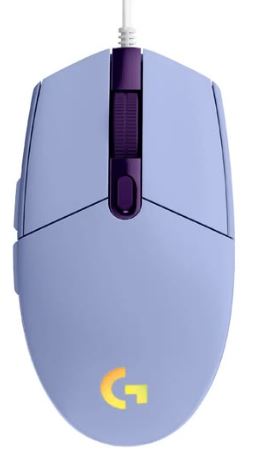
The Logitech G203 LIGHTSYNC continues to be one of the best budget gaming mice available. It offers excellent tracking performance, reliable build quality and a comfortable shape that works well for a wide variety of grip styles and game genres.
Specifications
Sensor: Logitech HERO 12K
Weight: 85g
Buttons: 6 Programmable Buttons
Price: $29–$38
Why Buy It?
The G203 combines a reliable gaming sensor, low click latency and Logitech’s proven build quality into an affordable package. Whether you’re playing Apex Legends, Valorant, Counter-Strike 2 or Fortnite, the G203 delivers consistent and accurate tracking.
Best For: Gamers looking for the best overall wired gaming mouse under $40.
Logitech G502 HERO (Best Feature-Packed Gaming Mouse)
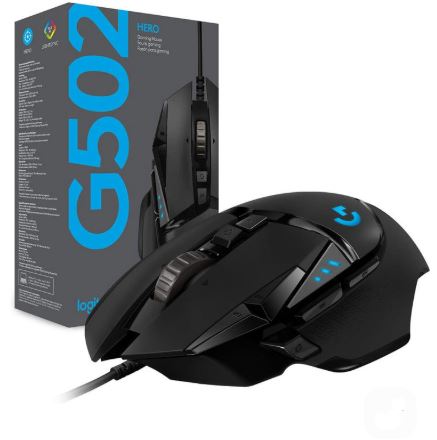
The Logitech G502 HERO has become one of the most iconic gaming mice ever made. While it is heavier than many modern FPS mice, it makes up for it with excellent customization options and one of the best sensors available in this price range.
Specifications
Sensor: Logitech HERO 25K
Weight: 121g
Buttons: 11 Programmable Buttons
Price: $32–$39
Why Buy It?
The G502 HERO offers exceptional tracking accuracy, customizable weights and plenty of programmable buttons for gamers who enjoy tweaking their setup. It’s an excellent option for players who want versatility alongside strong gaming performance.
Best For: Gamers who want maximum customization and extra buttons.
HyperX Pulsefire Haste 2 (Best Lightweight FPS Mouse)
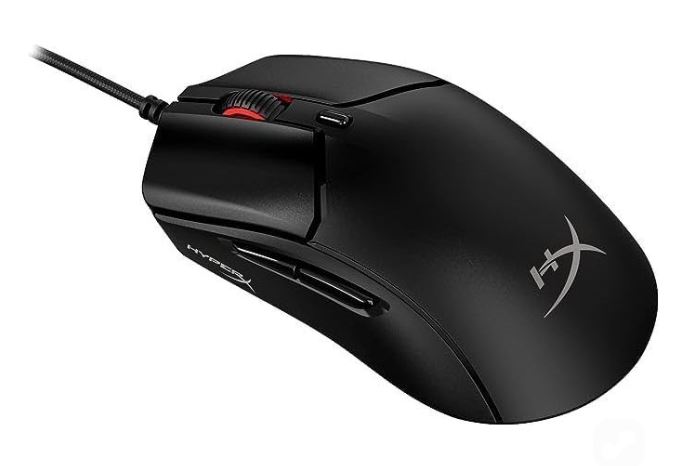
The HyperX Pulsefire Haste 2 is designed specifically for competitive gaming. Its lightweight design and responsive sensor make it a fantastic choice for FPS players who prioritize fast movements and precise aiming.
Specifications
Sensor: HyperX High-End Optical Sensor
Weight: 60–65g
Buttons: 6 Programmable Buttons
Price: $35–$39
Why Buy It?
The lightweight design allows for quicker flicks and easier tracking during fast-paced matches. Combined with excellent glide and low click latency, the Pulsefire Haste 2 is one of the strongest FPS gaming mice available under $40.
Best For: Competitive FPS gamers playing Valorant, Counter-Strike 2 and Apex Legends.
Redragon M987-K / Griffin M607 (Best Budget RGB Gaming Mouse)
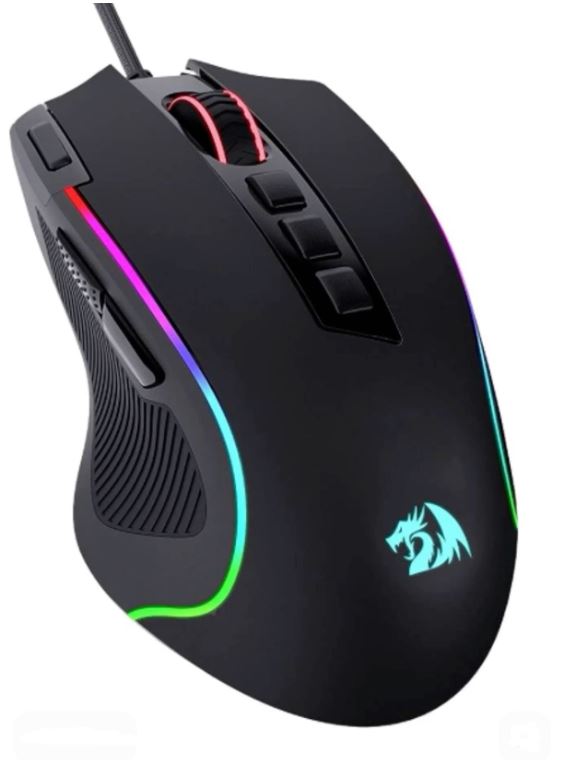
For gamers who want strong value and customizable RGB lighting, Redragon offers some surprisingly capable options. While they don’t quite match premium brands in overall refinement, they provide excellent features for the price.
Specifications
Sensor: High DPI Optical Sensor
Weight: 80–90g
Buttons: 7–9 Programmable Buttons
Price: $22–$32
Why Buy It?
Redragon gaming mice deliver respectable gaming performance, attractive RGB lighting and plenty of programmable buttons while remaining highly affordable. They’re a great entry point for budget-conscious gamers.
Best For: Gamers looking for RGB features on a tight budget.
Corsair Katar Pro XT (Best Symmetrical Gaming Mouse)
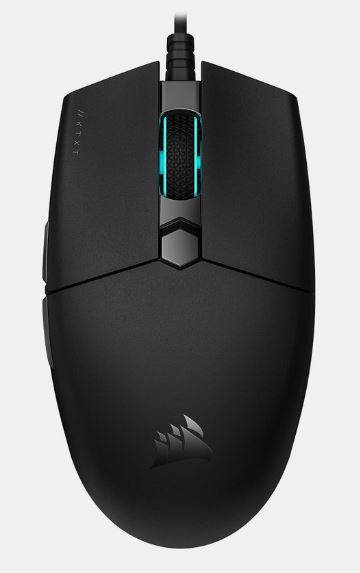
The Corsair Katar Pro XT is a lightweight gaming mouse designed for players who prefer a simple and symmetrical shape. Its comfortable design works particularly well for claw grip and fingertip grip users.
Specifications
Sensor: Corsair Optical Gaming Sensor
Weight: 75–80g
Buttons: 6 Programmable Buttons
Price: $28–$35
Why Buy It?
The Katar Pro XT focuses on delivering lightweight performance and reliable tracking without unnecessary features. It’s comfortable, responsive and offers excellent value for FPS gamers.
Best For: Gamers who prefer symmetrical gaming mice and lightweight designs.
Common Mistakes When Buying a Wired Gaming Mouse Under $40
Buying a Gaming Mouse Based on RGB Alone
One of the biggest mistakes gamers make is choosing a mouse simply because it has flashy RGB lighting. Many budget gaming mice use aggressive RGB effects to attract buyers, but lighting has little impact on actual gaming performance.
Instead of focusing on RGB, pay attention to the sensor, click latency, weight and cable quality. A gaming mouse with an excellent sensor and responsive clicks will improve your gaming experience far more than colorful lighting ever will.
Remember, RGB should be considered a bonus feature, not the reason you buy a gaming mouse.
Ignoring Hand Size and Grip Style
Not every gaming mouse is designed for every hand size or grip style. Some mice are better suited for palm grip users, while others work best for claw grip or fingertip grip players.
A mouse that feels uncomfortable in your hand can negatively affect your aim, reaction time and overall gaming experience. Before purchasing a gaming mouse, check its dimensions and consider whether it suits your preferred grip style.
Comfort is one of the most important factors in competitive FPS gaming.
Buying a Mouse That Is Too Heavy
While weight preference is subjective, most competitive FPS players prefer lightweight gaming mice. A lighter mouse requires less effort to move, making it easier to perform fast flicks, track targets and make quick adjustments during intense gunfights.
For FPS games such as Apex Legends, Valorant and Counter-Strike 2, many gamers prefer mice weighing between 60g and 90g.
A heavier mouse isn’t necessarily bad, but lightweight designs are generally favored by competitive players.
Ignoring Sensor Quality
The sensor is arguably the most important component of any gaming mouse. A poor sensor can result in inaccurate tracking, inconsistent movement and a frustrating gaming experience.
Reputable brands such as Logitech, Razer, HyperX, SteelSeries and Corsair invest heavily in sensor technology to ensure accurate tracking and reliable performance.
Whenever possible, choose a gaming mouse with a proven optical gaming sensor from a trusted manufacturer.
Using an Office Mouse for FPS Games
Office mice are designed for everyday productivity tasks such as browsing the web, editing documents and general computer use. They are not built with competitive gaming in mind.
Many office mice feature lower-quality sensors, higher click latency and limited tracking capabilities. During fast-paced FPS games, this can lead to inconsistent movement, skipped tracking and reduced accuracy.
If you’re serious about improving your performance in games such as Apex Legends, Counter-Strike 2 and Valorant, investing in a proper gaming mouse is one of the best upgrades you can make.
Conclusion
A wired gaming mouse remains one of the best upgrades you can make for competitive FPS gaming. Despite the rise of wireless technology, wired gaming mice continue to offer exceptional performance, low click latency and reliable tracking while remaining incredibly affordable.
Whether you choose the Logitech G203 LIGHTSYNC for its overall value, the HyperX Pulsefire Haste 2 for competitive FPS gaming, the Logitech G502 HERO for customization or any of the other mice on this list, you’re getting a gaming peripheral capable of improving your aim and overall gaming experience without spending more than $40.
The most important thing is to focus on the features that truly matter. A high-quality sensor, comfortable shape, low click latency and a lightweight design will have a much bigger impact on your performance than flashy RGB lighting or aggressive marketing claims.
To complete your FPS gaming setup, be sure to check out our Best Budget Gaming Mousepad for FPS (2026 Guide), Best Budget Gaming Keyboard for FPS (2026 Guide) and Best Budget Gaming Headset for FPS (2026 Guide). Combining a quality gaming mouse with the right peripherals can significantly improve comfort and consistency during long gaming sessions.
If you’re gaming on a laptop, you may also find our Best Gaming Laptop Under $500 (2026 Guide), Best Gaming Laptop Under $1000 (2026 Guide) and Best Gaming Laptop Under $1500 (2026 Guide) helpful when choosing a system that matches your budget and performance needs.
At the end of the day, a great gaming mouse doesn’t have to be expensive. The gaming mice featured in this guide prove that even on a tight budget, you can get the precision, responsiveness and reliability needed to compete in modern FPS games such as Apex Legends, Counter-Strike 2, Valorant and Rainbow Six Siege.