If you’ve played a lot of competitive shooters, you’ll quickly notice that Counter-Strike 2 isn’t a movement-heavy game. Unlike games such as Apex Legends or The Finals, where advanced movement is used to throw off your opponent’s aim, movement in Counter-Strike 2 exists mainly to complement your aim rather than replace it.
That doesn’t mean movement isn’t important. Techniques such as counter-strafing, jiggle peeking, bunny hopping, quick weapon switching, and efficient utility usage all rely on precise and responsive key presses. Executing these mechanics consistently can often be the difference between winning and losing a round.
A quality gaming keyboard won’t suddenly improve your aim, but it can make your movement feel more responsive, your inputs more consistent, and your overall gameplay more reliable. In a game where every millisecond matters, having hardware you can trust is always an advantage.
So, what should you actually look for when buying a gaming keyboard specifically for Counter-Strike 2?
Affiliate Disclosure
Some of the links in this article are affiliate links, which means I may earn a small commission if you purchase a product through one of these links, at no additional cost to you. This helps support me and allows me to continue creating gaming guides and hardware recommendations.
What to Expect
Before buying a gaming keyboard for Counter-Strike 2, there are a few important features you should understand. While keyboards don’t directly improve your aim, they do make your movement, counter-strafing, and utility usage feel more consistent and responsive.
Switch Type
Mechanical keyboards should be your first choice because every key registers independently, making them much more responsive than membrane keyboards. Mechanical keyboards come with three main switch types: Linear, Tactile, and Clicky.
For Counter-Strike 2, Red Linear switches are the most recommended. They have a smooth keystroke with no tactile bump, making repeated key presses faster and requiring less force to actuate. Tactile switches are still a good option if you prefer feedback, while Clicky (Blue) switches are generally not recommended because they’re louder and can become distracting during long gaming sessions.
Hall Effect Switches
Hall Effect keyboards have become increasingly popular thanks to features like Rapid Trigger, Adjustable Actuation, and Snap Tap (SOCD). Rapid Trigger allows keys to reset instantly as you release them, making repeated movements feel incredibly responsive.
Although Counter-Strike 2 isn’t as movement-focused as Apex Legends, these features can still make counter-strafing, jiggle peeking, and quick directional changes feel more precise. Just keep in mind that some tournaments restrict certain Hall Effect features, so always check the competition rules if you plan to compete.
Keyboard Size
Most Counter-Strike 2 players use low mouse sensitivity, which means they need plenty of desk space for large arm movements. That’s why 60%, 65%, 75%, and TKL (Tenkeyless) keyboards are the most popular choices.
A full-size keyboard isn’t necessarily bad, but the extra number pad takes up valuable mouse space that most competitive players rarely use. Personally, I think a TKL keyboard offers the best balance between functionality and desk space.
Build Quality
A gaming keyboard should feel solid and durable. Look for keyboards with PBT keycaps, sturdy aluminum or high-quality plastic construction, and well-lubricated stabilizers. A quality build not only lasts longer but also provides a more satisfying and consistent typing experience.
Wired or Wireless
Choosing between wired and wireless comes down to personal preference. If you want a cleaner-looking setup, modern wireless gaming keyboards are an excellent choice because today’s low-latency wireless technology performs almost identically to wired connections.
Unlike gaming mice, where removing the cable noticeably improves freedom of movement, a keyboard stays in one place on your desk. Because of that, choosing a wired or wireless keyboard doesn’t significantly affect your gameplay—it mostly comes down to aesthetics, convenience, and whether you want to worry about charging the battery.
Input Latency
Input latency is the delay between pressing a key and that action appearing in-game. Lower latency means your counter-strafes, jumps, weapon swaps, and utility throws register more quickly. Fortunately, most modern mechanical gaming keyboards already offer excellent latency, but it’s still worth checking reviews before making a purchase.
Future-Proofing
Most modern mechanical keyboards feature hot-swappable switches, allowing you to replace or upgrade individual switches without buying an entirely new keyboard. Combined with firmware updates and durable construction, a quality mechanical keyboard can easily last for many years, making it one of the best long-term investments for your gaming setup.
Best Gaming Keyboards for Counter-Strike 2
Counter-Strike 2 is built around precision, and no mechanic is more important than counter-strafing—tapping the opposite movement key to instantly stop your momentum before firing. How quickly your keyboard registers that release-and-press directly affects how fast your accuracy resets, which is why Hall Effect switches and Rapid Trigger technology have become so popular among competitive players. Below are our top gaming keyboard recommendations for Counter-Strike 2, each selected for its responsiveness, build quality, and competitive performance.
Best Overall Gaming Keyboard
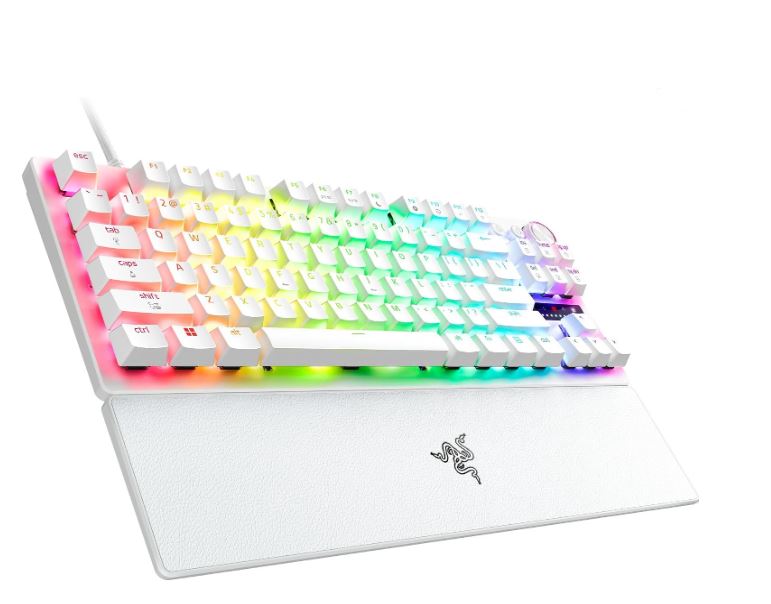
Razer Huntsman V3 Pro TKL 8KHz (Analog Optical / TKL)
~$219.99
Best For: Competitive Players & Esports Enthusiasts
Why It’s the Best:
The Razer Huntsman V3 Pro TKL is one of the most-used keyboards among professional Counter-Strike 2 players. Its Analog Optical switches deliver Rapid Trigger performance comparable to Hall Effect keyboards while maintaining Razer’s premium build quality and mature Synapse software. Every feature is designed with competitive gaming in mind.
Pros:
- Outstanding Rapid Trigger performance
- Adjustable actuation for faster counter-strafing
- Snap Tap improves opposite-direction key inputs
- Premium doubleshot PBT keycaps
- 8,000Hz polling rate
Cons:
- Expensive compared to similar-performing Hall Effect keyboards
- Optical switches sound slightly hollow
Best Budget Gaming Keyboard
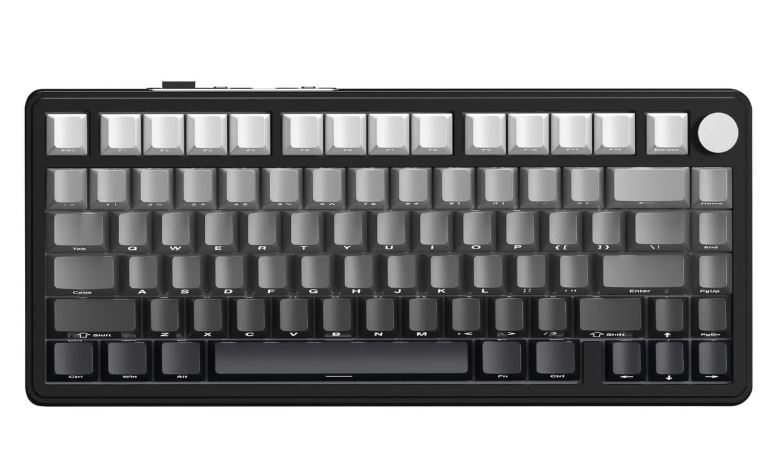
Gamakay x NaughShark NS68 (Hall Effect / 68%)
~$54.99
Best For: Budget Competitive Gaming
Why It’s the Best:
The NS68 proves you don’t need to spend over $200 to experience Hall Effect technology. With Rapid Trigger, adjustable actuation, and an 8,000Hz polling rate, it delivers genuine competitive features at an entry-level price.
Pros:
- Genuine Hall Effect switches
- Rapid Trigger support
- Compact 68% layout
- Excellent value
- 8,000Hz polling rate
Cons:
- Plastic construction
- Basic software
Best Value Gaming Keyboard
DrunkDeer A75 Ultra (Hall Effect / 75%)
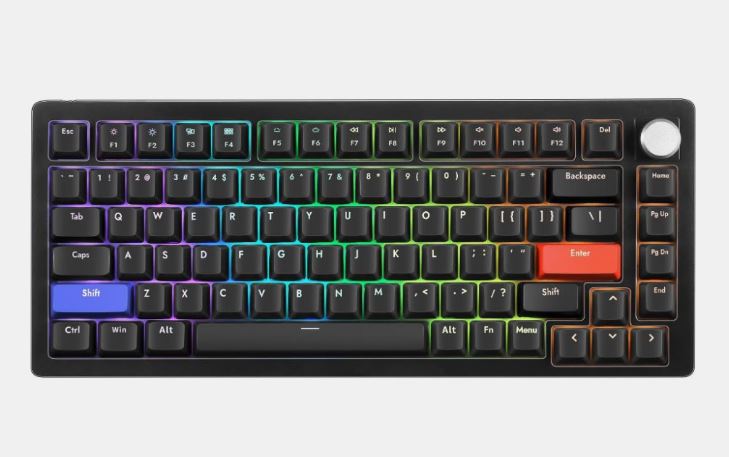
~$109.99
Best For: Best Price-to-Performance
Why It’s the Best:
The DrunkDeer A75 Ultra delivers nearly flagship Hall Effect performance for almost half the price. With Rapid Trigger, adjustable actuation, excellent latency, and a comfortable 75% layout, it’s one of the strongest values available for Counter-Strike 2 players.
Pros:
- Outstanding Hall Effect performance
- Excellent value
- Comfortable 75% layout
- Rapid Trigger support
- Competitive latency
Cons:
- Software isn’t as polished as Wooting’s
- Build quality isn’t as premium as flagship boards
Best Hall Effect Gaming Keyboard
Wooting 80HE (Hall Effect / TKL)
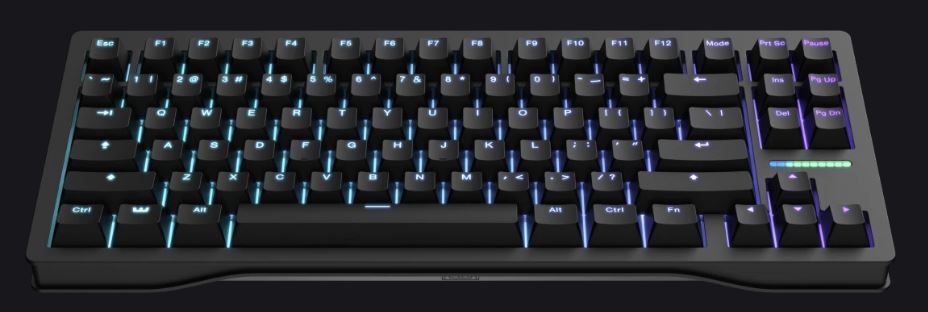
~$199.99
Best For: Hall Effect Enthusiasts
Why It’s the Best:
Wooting pioneered modern Hall Effect gaming keyboards, and the 80HE remains the benchmark. Its Rapid Trigger implementation, adjustable actuation, and Wootility software continue to set the standard for competitive keyboards.
Pros:
- Industry-leading Rapid Trigger
- Exceptional Wootility software
- Per-key adjustable actuation
- Analog input support
- Extremely low latency
Cons:
- Wired only
- Plastic chassis feels average for the price
Best Gaming Keyboard for Streamers & Content Creators
Keychron K2 HE (Hall Effect / Wireless / 75%)
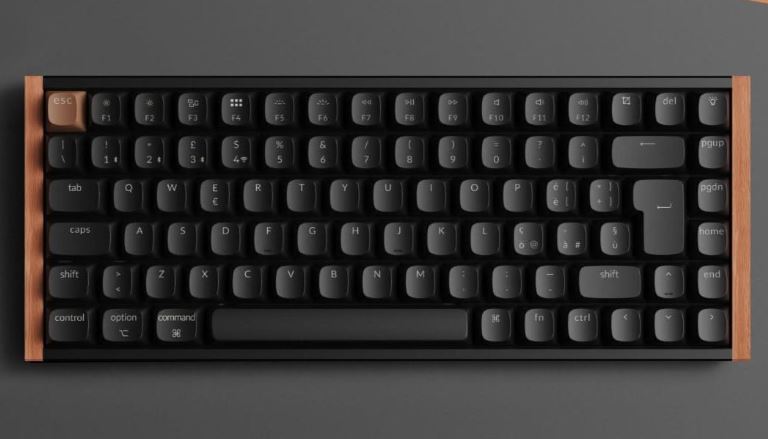
~$99.99
Best For: Streaming & Content Creation
Why It’s the Best:
The Keychron K2 HE combines Hall Effect switches with wireless connectivity, making it an excellent option for creators who want a cleaner desk setup without sacrificing gaming performance. Its excellent software and compact 75% layout also make it a fantastic keyboard for productivity between gaming sessions.
Pros:
- Wireless Hall Effect keyboard
- Great software
- Hot-swappable switches
- Excellent typing experience
- Compact 75% layout
Cons:
- Slightly higher latency in wireless mode
- Average battery life
Best Premium Gaming Keyboard
SteelSeries Apex Pro TKL Gen 3 Wireless (OmniPoint 3.0 Hall Effect / TKL)
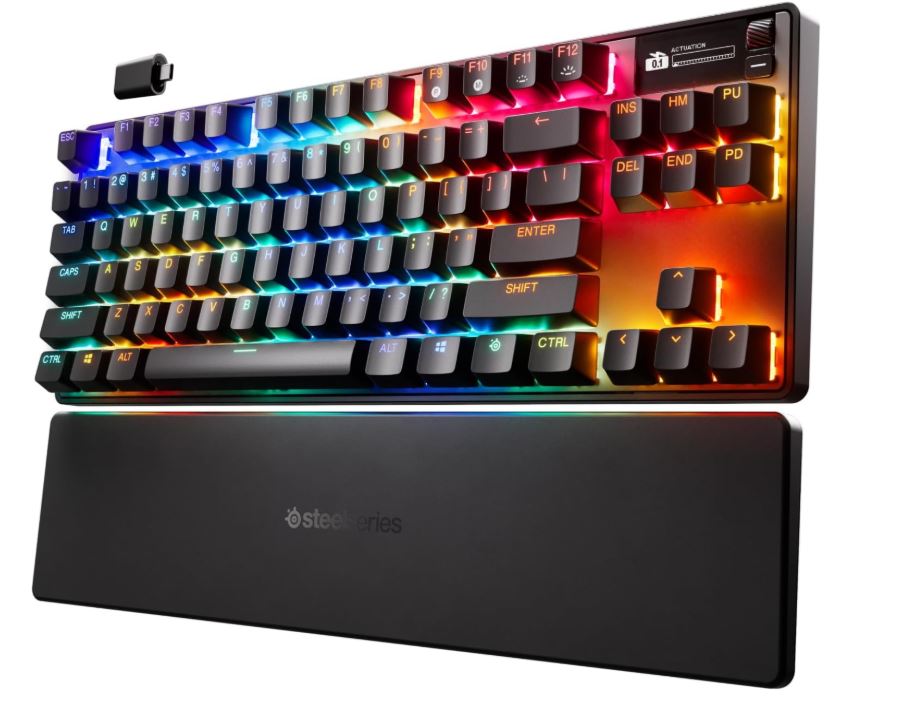
~$249.99
Best For: Ultimate No-Compromise Gaming
Why It’s the Best:
If you want every premium feature available, the SteelSeries Apex Pro TKL Gen 3 Wireless delivers. OmniPoint 3.0 switches, Rapid Trigger, Rapid Tap, wireless connectivity, an OLED display, and premium acoustics make it one of the most complete gaming keyboards currently available.
Pros:
- Premium Hall Effect switches
- OLED display
- Excellent wireless latency
- Rapid Trigger & Rapid Tap presets
- Outstanding build quality
Cons:
Wooting still offers slightly finer actuation tuning
Highest price on this list
Conclusion
Choosing the best gaming keyboard for Counter-Strike 2 isn’t about buying the most expensive keyboard—it’s about finding one that feels comfortable, responsive, and reliable every time you press a key. Whether you’re counter-strafing, jiggle peeking, bunny hopping, or throwing the perfect flash, a quality mechanical keyboard ensures every input is registered as quickly and accurately as possible.
If you’re shopping on a budget, a good mechanical keyboard with linear switches is more than enough to get started. For players looking to gain every possible competitive advantage, Hall Effect keyboards with Rapid Trigger and adjustable actuation can make movement feel even more responsive. Just remember that while premium hardware can remove limitations, your positioning, game sense, and practice will always have a bigger impact on your performance.
If you’re building the ultimate Counter-Strike 2 gaming setup, don’t forget to check out my Best Gaming Monitor for Counter-Strike 2, Best Gaming Mouse for Counter-Strike 2, Best Gaming PC for Counter-Strike 2, Best Gaming Laptop for Counter-Strike 2, Best CPU for Counter-Strike 2, Best GPU for Counter-Strike 2, Best Gaming Headset for Counter-Strike 2, and Best Gaming Mousepad for Counter-Strike 2 guides. Together, they’ll help you build a setup that’s optimized for higher FPS, lower input lag, smoother gameplay, and a better overall Counter-Strike 2 experience.
At the end of the day, the best gaming keyboard for Counter-Strike 2 is the one that lets you focus entirely on your crosshair, your positioning, and your decision-making not your hardware.